Family Sport Games: Difference between revisions
From Handhelds Wiki
Jump to navigationJump to search
HandheldWiki (talk | contribs) |
|||
| Line 28: | Line 28: | ||
{{SectionStyleStart}} | {{SectionStyleStart}} | ||
== User Guide == | == User Guide == | ||
* Family Sport 120-in-1: [https://s3.amazonaws.com/magento-luzerne/user_guide/GP-120-EN.pdf link] (in English) | |||
Family Sport | * Family Sport 100-in-1: [https://cdn.billiger.com/dynimg/_4tFjnKWFF1Bfqhi2J37j_t4H9rycHjeBa9LTdXG2DAgbGaJj_R51nkyvzxGtPo9l55sktPq2Jp98eWxteBSrA/Millennium-Arcade-Neo-weiss-silber-Bedienungsanleitung-39e355.pdf link] (in German) | ||
Family Sport | |||
{{SectionStyleEnd}} | {{SectionStyleEnd}} | ||
{{SectionStyleStart}} | {{SectionStyleStart}} | ||
== Games == | == Games == | ||
Revision as of 13:42, 11 November 2025
Versions
-
Family Sport 100-in-1 logo type 1 -
Family Sport 100-in-1 logo type 2 -
Family Sport 120-in-1 logo -
Family Sport 200-in-1 logo -
Family Sport 220-in-1 logo type 2 -
Family Sport 220-in-1 logo -
Game Station 2 101-in-1 logo -
Millennium Arcade 250 (M527) logo


_logo.png)
Overview
Handhelds that are running this software are at the Uncategorized handhelds page.
Read more about this software at the BootlegGames Wiki.
Games
Playlist with 251 videos: https://www.youtube.com/playlist?list=PLyBvc1Y7TSqZ34PTkpQqN6INIpHmEjkCb
Forum thread with lots of game tested: https://talking-time.net/index.php?threads/what%E2%80%99s-on-this-10-handheld-two-my-arcade-go-gamer-edition.2266/
Other ressources
http://adb.arcadeitalia.net/lista_mame.php?ricerca=family+sport&arcade_only=0
Emulating these games
It's possible to run this software through the MAME emulator.
-
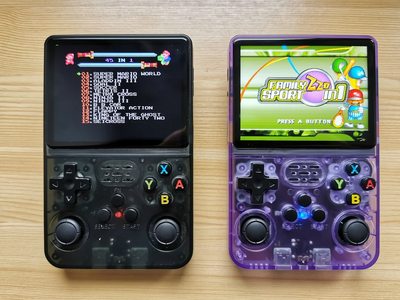
R36S emulating bootleg games

Other Projects at the Handhelds Wiki