Anbernic RG40XX H File Transfer
Transferring files via WiFi (muOS)[edit]
For more methods and information, please refer to the documentation of the firmware you are using.
https://muos.dev/help/addcontent
FileZilla - SFTP (muOS)[edit]
- On muOS you need to configure a Wi-Fi connection and enable SFTP + Filebrowser in the settings.
- On your PC download the FileZilla Client (Website: https://filezilla-project.org/).
- Make sure you are on the same network and connect to your device.
- Now you can share files between your devices.
-

Web Services -

Enable SFTP + Filebrowser


Here are the login details for muOS:
- Host: <YOUR IP ADDRESS> (example: 192.168.1.81) - Found in Wi-Fi Network settings
- Port: 2022
- Username: muos
- Password: muos
-
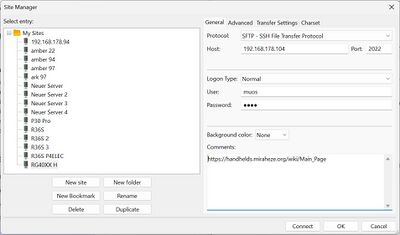
Managing multiple devices/firmwares: FileZilla -> File -> Site Manager -
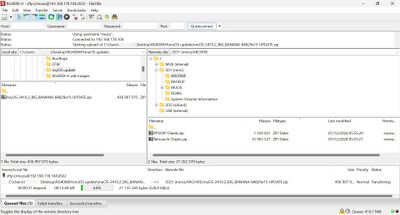
FileZilla interface - video tutorial


Transferring files via WiFi (Knulli)[edit]
For more methods and information, please refer to the documentation of the firmware you are using.
https://knulli.org/de/play/add-games/network-transfer/
Knulli SCP/SFTP connection[edit]
- Host: <YOUR IP ADDRESS>
- Port: 22
- Username: root
- Password: linux
Transferring files via Android Phone[edit]
Use a file manager of your choice with SFTP support. For example:
How to add more games[edit]
ROM Usage & Legal Disclaimer
Emulators are legal and preserve retro games, but downloading copyrighted ROMs without permission may be illegal. This site does not host or link to ROMs.
Homebrew & Public Domain Games
Freely available ROMs by independent devs are great for testing and exploring.
Curated ROM Sets
These search terms are provided for informational and archival research purposes only. This site does not host or link to copyrighted content.
Transferring Files
Use microSD or USB to add ROMs and BIOS files. Organize them per emulator’s folder structure and always eject devices properly.
BIOS Files & Requirements
Some systems like PlayStation or Neo Geo require BIOS files for emulation, which must be legally obtained by dumping from your own hardware. We do not host or distribute BIOS files. For general discussion about BIOS requirements, you may find community forums helpful, such as this Reddit thread. Please ensure you comply with all applicable laws.
Helpful Links
- Reddit community: r/roms (for discussion purposes only)
- Internet Archive (Homebrew/PD games)
- GameBrew (Wiki for homebrew games)
Recommended Games
- /v/'s Recommended Games Wiki
- Retro Sanctuary (Site with Top 100 games lists for lots of systems)
- Racket Boy Hidden Gems List
- PortMaster (sort by most downloads)
- List of great homebrew games
- Great retro games that can be finished in one sitting
- Game of the month list from r/EmulationOnAndroid
- D-pad only games (for handhelds without joysticks)
- Recommended DS games that require little to no touchpad controls
- Recommended PICO-8 games
Other Projects at the Handhelds Wiki