RG40XX H Advanced Guides ‐ Tutorials: Difference between revisions
HandheldWiki (talk | contribs) No edit summary |
HandheldWiki (talk | contribs) No edit summary |
||
| Line 1: | Line 1: | ||
{{Template:Anbernic RG40XX H WIKI page navigation new}} | {{#seo: | ||
|image=Anbernic_RG40XX_H_wiki.png | |||
|title={{PAGENAME}} | |||
|description=SFTP, SSH, Syncthing, RetroArch guides and more! | |||
|keywords=handheld, retro, gaming, cheap, specs, video, review, cfw, firmware, download, compatibility}}{{Template:Anbernic RG40XX H WIKI page navigation new}}{{TOC|limit=4}}{{Movetotop}}{{SectionStyleStart}} | |||
== Transferring files via WiFi (muOS) == | == Transferring files via WiFi (muOS) == | ||
| Line 31: | Line 34: | ||
</ul></div> | </ul></div> | ||
{{SectionStyleEnd}} | |||
{{SectionStyleStart}} | |||
== Transferring files via WiFi (Knulli) == | == Transferring files via WiFi (Knulli) == | ||
| Line 44: | Line 49: | ||
* Password: linux | * Password: linux | ||
{{SectionStyleEnd}} | |||
{{SectionStyleStart}} | |||
== Transferring files via Android Phone == | == Transferring files via Android Phone == | ||
| Line 52: | Line 59: | ||
* [https://play.google.com/store/apps/details?id=lysesoft.andftp AndFTP] | * [https://play.google.com/store/apps/details?id=lysesoft.andftp AndFTP] | ||
{{SectionStyleEnd}} | |||
{{SectionStyleStart}} | |||
== Syncthing and Backups == | == Syncthing and Backups == | ||
| Line 64: | Line 73: | ||
Backup your current settings: https://knulli.org/configure/reset-to-factory-settings/#back-up-your-current-settings | Backup your current settings: https://knulli.org/configure/reset-to-factory-settings/#back-up-your-current-settings | ||
{{SectionStyleEnd}} | |||
{{SectionStyleStart}} | |||
== RetroArch Guides == | == RetroArch Guides == | ||
* [https://retrogamecorps.com/2022/02/28/retroarch-starter-guide/ RetroArch Starter Guide (Core options, RetroAchievements, Cheats,...)] | * [https://retrogamecorps.com/2022/02/28/retroarch-starter-guide/ RetroArch Starter Guide (Core options, RetroAchievements, Cheats,...)] | ||
| Line 71: | Line 82: | ||
* [https://docs.libretro.com/ Official RetroArch / Libretro Documentation] | * [https://docs.libretro.com/ Official RetroArch / Libretro Documentation] | ||
{{SectionStyleEnd}} | |||
{{SectionStyleStart}} | |||
== Other Stuff == | == Other Stuff == | ||
| Line 77: | Line 90: | ||
* [https://retrogamecorps.com/2021/09/23/guide-moonlight-on-retro-handhelds/ Game Streaming/Moonlight] | * [https://retrogamecorps.com/2021/09/23/guide-moonlight-on-retro-handhelds/ Game Streaming/Moonlight] | ||
{{SectionStyleEnd}} | |||
{{SectionStyleStart}} | |||
== "AppStore" and "File Downloader" GUI == | == "AppStore" and "File Downloader" GUI == | ||
| Line 89: | Line 104: | ||
</ul></div> | </ul></div> | ||
{{SectionStyleEnd}} | |||
{{SectionStyleStart}} | |||
== muOS Portmaster Guide == | == muOS Portmaster Guide == | ||
<youtube width="400">https://www.youtube.com/watch?v=fcoDqDY4qSU</youtube> | <youtube width="400">https://www.youtube.com/watch?v=fcoDqDY4qSU</youtube> | ||
{{SectionStyleEnd}} | |||
{{SectionStyleStart}} | |||
== Knulli Portmaster Guide == | == Knulli Portmaster Guide == | ||
https://www.reddit.com/r/SBCGaming/comments/1hoiy8a/ultimate_portmaster_guide_for_knulli_firefly/ | https://www.reddit.com/r/SBCGaming/comments/1hoiy8a/ultimate_portmaster_guide_for_knulli_firefly/ | ||
{{ | {{SectionStyleEnd}} | ||
[[Category:Anbernic RG40XX H WIKI]] | [[Category:Anbernic RG40XX H WIKI]] | ||
{{Template:Anbernic RG40XX H WIKI navbar}} | {{Template:Anbernic RG40XX H WIKI navbar}} | ||
Latest revision as of 05:27, 19 June 2025
Transferring files via WiFi (muOS)[edit]
For more methods and information, please refer to the documentation of the firmware you are using.
https://muos.dev/help/addcontent
FileZilla - SFTP (muOS)[edit]
- On muOS you need to configure a Wi-Fi connection and enable SFTP + Filebrowser in the settings.
- On your PC download the FileZilla Client (Website: https://filezilla-project.org/).
- Make sure you are on the same network and connect to your device.
- Now you can share files between your devices.
-

Web Services -

Enable SFTP + Filebrowser


Here are the login details for muOS:
- Host: <YOUR IP ADDRESS> (example: 192.168.1.81) - Found in Wi-Fi Network settings
- Port: 2022
- Username: muos
- Password: muos
-
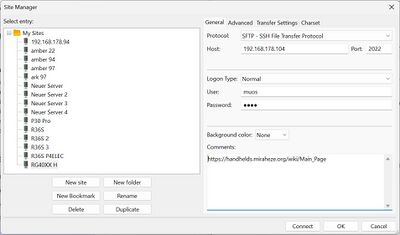
Managing multiple devices/firmwares: FileZilla -> File -> Site Manager -
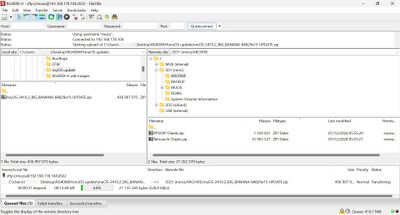
FileZilla interface - video tutorial


Transferring files via WiFi (Knulli)[edit]
For more methods and information, please refer to the documentation of the firmware you are using.
https://knulli.org/de/play/add-games/network-transfer/
Knulli SCP/SFTP connection[edit]
- Host: <YOUR IP ADDRESS>
- Port: 22
- Username: root
- Password: linux
Transferring files via Android Phone[edit]
Use a file manager of your choice with SFTP support. For example:
Syncthing and Backups[edit]
Syncthing Guide: https://retrogamecorps.com/2024/08/11/guide-using-syncthing-with-retro-handhelds/
muOS[edit]
Backup feature: https://muos.dev/help/install#updating-an-existing-install
Knulli[edit]
Backup your current settings: https://knulli.org/configure/reset-to-factory-settings/#back-up-your-current-settings
RetroArch Guides[edit]
Other Stuff[edit]
- Syncthing to sync saves and states between devices
- Portmaster
- Game Streaming/Moonlight
"AppStore" and "File Downloader" GUI[edit]
Download: https://github.com/MrJackSpade/RG35XX-Store/tree/main
Add your application: https://github.com/MrJackSpade/RG35XX-Store/blob/main/AppStore/README.md
Discussion on Reddit: https://www.reddit.com/r/RG35XX/comments/1h0vd35/appstore_and_file_downloader_gui_updates/

muOS Portmaster Guide[edit]
Knulli Portmaster Guide[edit]
https://www.reddit.com/r/SBCGaming/comments/1hoiy8a/ultimate_portmaster_guide_for_knulli_firefly/
Other Projects at the Handhelds Wiki






