R40: Difference between revisions
No edit summary |
|||
| Line 1: | Line 1: | ||
{{HandheldPage | {{HandheldPage | ||
|Image=R40 white.webp | |Image=R40 white.webp | ||
|Brand=Manufacturers: Other | |||
|Brand Other=Shenzhen Zhengmanlong Commerce Electronic | |Brand Other=Shenzhen Zhengmanlong Commerce Electronic | ||
|Release Year=2025 | |Release Year=2025 | ||
| Line 23: | Line 24: | ||
|Price Range 1=Price Range $20-$50 | |Price Range 1=Price Range $20-$50 | ||
}} | }} | ||
{{Warning |There are probably 2 versions of this handheld. One with a weaker chip and restricted OS like the SF3000/GB350. A newer one appeared in | {{Warning |There are probably 2 versions of this handheld. One with a weaker chip and restricted OS like the SF3000/GB350. A newer one appeared in November 2025 which looks like it has the RK3326 chip and runs ArkOS. | ||
}} | }} | ||
{{SectionStyleStart}} | {{SectionStyleStart}} | ||
== Performance == | == Performance == | ||
Similar to R36S Clone, with improved CPU and RAM. | Similar to R36S Clone, with improved CPU and RAM. | ||
| Line 52: | Line 51: | ||
== Price == | == Price == | ||
~$30 | ~$30 | ||
| Line 64: | Line 62: | ||
{{SectionStyleStart}} | {{SectionStyleStart}} | ||
== Colors == | == Colors == | ||
<div><ul> | <div><ul> | ||
<li style="display: inline-block; vertical-align: top;"> [[File:R40 black.webp|thumb|none|400px]] </li> | <li style="display: inline-block; vertical-align: top;"> [[File:R40 black.webp|thumb|none|400px]] </li> | ||
| Line 74: | Line 71: | ||
{{SectionStyleStart}} | {{SectionStyleStart}} | ||
== More Images == | == More Images == | ||
<div><ul> | <div><ul> | ||
<li style="display: inline-block; vertical-align: top;"> [[File:R40 packaging and OS.webp|thumb|none|400px|SF3000/GB350 version - image source: [https://discord.com/channels/741895796315914271/1274131112351764532/1392170189352603739 discord]]] </li> | <li style="display: inline-block; vertical-align: top;"> [[File:R40 packaging and OS.webp|thumb|none|400px|SF3000/GB350 version - image source: [https://discord.com/channels/741895796315914271/1274131112351764532/1392170189352603739 discord]]] </li> | ||
| Line 85: | Line 81: | ||
== More Information == | == More Information == | ||
Manual (SF3000/GB350 version): [[File:R40_manual_from_temu.pdf]] | Manual (SF3000/GB350 version): [[File:R40_manual_from_temu.pdf]] | ||
| Line 99: | Line 94: | ||
== Firmware == | == Firmware == | ||
=== SF3000/GB350 version === | === SF3000/GB350 version === | ||
No working CFW for this console version available (as of November 2025). | |||
No working | |||
=== RK3326 version === | === RK3326 version === | ||
Custom Firmware: | Custom Firmware: | ||
Revision as of 13:02, 24 November 2025
| R40 | |
|---|---|
 | |
| Specification | |
| Brand | Manufacturers: Other |
| Release Date | 07 / 2025 |
| Form Factor | Vertical |
| SoC | RK3326 |
| CPU | Quad-core @ 1.3Ghz |
| RAM | 1GB |
| Screen Size | 3.5" |
| Resolution | 640x480 |
| Aspect Ratio | 4:3 |
| Screen Type | IPS |
| OS | Linux |
| Internal Storage | No |
| External Storage | 2x MicroSD |
| WiFi | No |
| Video Output | None |
| Speaker | Mono |
| 3.5mm Audio Jack | Yes |
| Battery | 3000mAh |
Performance
Similar to R36S Clone, with improved CPU and RAM.
| Chip | Cores | Arch | Ghz |
|---|---|---|---|
| RK3326 | 4 | 64bit | 1.3 |
| Advertised | Actual |
|---|---|
| 2GB | 1GB |
Price
~$30
Get the R40: AliExpress1
1 Buying through these affiliate links helps support the wiki. Your price stays the same. Commissions go toward devices, testing, documentation, and server costs.
Colors


More Images
-
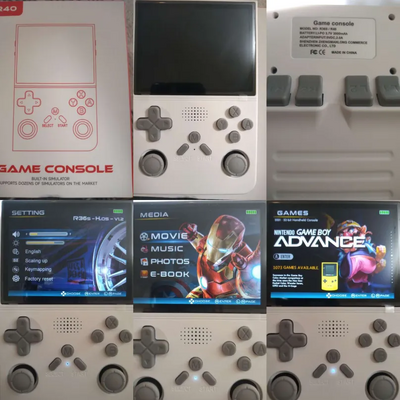
SF3000/GB350 version - image source: discord -

SF3000/GB350 version -
Logo found on the SD card (SF3000/GB350 version)


More Information
Manual (SF3000/GB350 version): File:R40 manual from temu.pdf
Videos
RK3326 version
Firmware
SF3000/GB350 version
No working CFW for this console version available (as of November 2025).
RK3326 version
Custom Firmware:
1. ARKOS K36
ArkOS K36 works on this device with some minor hiccups.
Selection:
Screenfiles: Panel 5
Files: rf3536k3ka.dtb & rk3326-evb-lp3-v12-linux.dtb
2. ROCKNIX
RockNix works beautifully on this device.
Follow instructions to install here: https://rocknix.org/devices/unbranded/EE-clones/
Use your original rf3536k3ka.dtb file and run it through this website to generate dtbo file, place that file in overlay folder as per website instructions.
Lastly to fix sound run this script in linux: tes2.sh
Other Projects at the Handhelds Wiki





