R36S Hardware Modifications: Difference between revisions
HandheldWiki (talk | contribs) No edit summary |
heat info |
||
| (40 intermediate revisions by 6 users not shown) | |||
| Line 1: | Line 1: | ||
{{R36S Handheld Wiki page navigation new}}{{TOC|limit=2}} | {{R36S Handheld Wiki page navigation new}}{{TOC|limit=2}}{{SectionStyleStart}} | ||
== More mods == | |||
'''Reddit:''' [https://www.reddit.com/r/R36S/comments/1iqovxw/fixed_the_sound/ Speaker replacement] | |||
'''Reddit:''' [https://www.reddit.com/r/R36S/comments/1hsrw3s/here_a_few_more_custom_battery_covers_flat_ones/ Custom battery covers] | |||
'''Reddit:''' [https://www.reddit.com/r/R36S/comments/1idv41l/some_questions_about_apps_and_oc/ Heatsink and Fan] | |||
{{SectionStyleEnd}} | |||
{{SectionStyleStart}} | |||
== Battery extender with 2*18650 Li-Ion == | |||
{{Warning |This modification is unsafe. These 18650 Li-ion batteries can get very hot, possibly softening the plastic and causing catastrophic damage. If these batteries get damaged (e.g., R36S gets dropped and batteries get damaged), it can cause "thermal runaway", reaching internal battery temperatures of up to 1000 degrees celsius. This can nearly instantly kill the console, and can seriously harm you due to burns and toxic fumes. Heatsinks WILL NOT help with this.}} | |||
'''Reddit:''' [https://www.reddit.com/r/R36S/comments/1j3kb9z/battery_extender_with_218650_liion/ Battery extender with 2*18650 Li-Ion] | |||
Reddit | |||
Cover for 2 battery 3.7V Lithium 18650 with USB-C charging module. | Cover for 2 battery 3.7V Lithium 18650 with USB-C charging module. | ||
| Line 19: | Line 21: | ||
You need : | You need : | ||
1 x 3.7V Lithium Battery Charger 5V 1A 2A Li-ion Lipo Battery Charging Protect | * 1 x 3.7V Lithium Battery Charger 5V 1A 2A Li-ion Lipo Battery Charging Protect | ||
* 2 x Battery Shrapnel 18650 Battery Spring Positive And Negative Contact (need cut 2 spirale on negative contact) | |||
2 | * 1x JST 1.25mm PH2.0 XH2.54 2 Pin Male Plug (15cm) | ||
File for 3D Print : | |||
* https://cults3d.com/fr/mod%C3%A8le-3d/gadget/18650-cover-for-r36s | |||
https:// | You can use this [https://www.nkon.nl/fr/inr18650-mj1-3500mah-10a.html 3500mAh battery] to extend your battery to 7000mAh, but temperatures can and will rise, and can have severe battery health impact, alongside other things. | ||
<gallery widths="300px" heights="300px" perrow="5"> | |||
1740907697637.jpg | |||
1740909218171.jpg | |||
</gallery> | |||
{{SectionStyleEnd}} | |||
{{SectionStyleStart}} | |||
== Modding and Teardown Guide == | == Modding and Teardown Guide == | ||
| Line 43: | Line 44: | ||
<youtube width="400">https://www.youtube.com/watch?v=G46JO6Ljvh0</youtube> | <youtube width="400">https://www.youtube.com/watch?v=G46JO6Ljvh0</youtube> | ||
{{SectionStyleEnd}} | |||
{{SectionStyleStart}} | |||
== "Ultimate R36S" by Swimming-Emphasis-91 == | == "Ultimate R36S" by Swimming-Emphasis-91 == | ||
Reddit thread with lots of info and links to parts and guides: https://www.reddit.com/r/R36S/comments/1hj43z1/my_perhaps_ultimate_r36s/ | Reddit thread with lots of info and links to parts and guides: [https://www.reddit.com/r/R36S/comments/1hj43z1/my_perhaps_ultimate_r36s/ My (perhaps) ultimate R36S] | ||
* Hall | * Hall-Effect Joysticks | ||
* Heatsink | * Heatsink | ||
* Inbuilt Wi-Fi | * Inbuilt Wi-Fi | ||
* Inbuilt Bluetooth | * Inbuilt Bluetooth | ||
* Silence | * Silence Tactile Buttons | ||
* Anatomic | * Anatomic Shoulder Buttons | ||
* Rumble | * Rumble Motor | ||
* Theme | * Theme Modification | ||
< | <gallery widths="300px" heights="300px" perrow="5"> | ||
my-perhaps-ultimate-r36s-v0-3xq8cmwec58e1.webp | |||
my-perhaps-ultimate-r36s-v0-4bqftkwec58e1.webp | |||
my-perhaps-ultimate-r36s-v0-7il8cswec58e1.webp | |||
my-perhaps-ultimate-r36s-v0-a8f3ymwec58e1.webp | |||
my-perhaps-ultimate-r36s-v0-i806zkwec58e1.webp | |||
my-perhaps-ultimate-r36s-v0-n1rexmwec58e1.webp | |||
my-perhaps-ultimate-r36s-v0-wraweqwec58e1.webp | |||
my-perhaps-ultimate-r36s-v0-zimt4kxec58e1.webp | |||
</gallery> | |||
{{SectionStyleEnd}} | |||
{{SectionStyleStart}} | |||
== Shoulder Buttons / Noise Reduction == | == Shoulder Buttons / Noise Reduction == | ||
[https://www.youtube.com/watch?v=yVW6Jb_CmSA R36S shoulder button noise reduction (silent mod)] | {{Clickable button 3|[[R36S Shoulder Button Upgrade|↪ R36S Shoulder Button Upgrade Tutorial]]}} | ||
<gallery widths="300px" heights="300px" perrow="5"> | |||
R36S shoulder button upgrade1.jpg | |||
</gallery> | |||
'''YouTube:''' [https://www.youtube.com/watch?v=yVW6Jb_CmSA '''R36S shoulder button noise reduction (silent mod)'''] | |||
<youtube width="400">https://www.youtube.com/watch?v=yVW6Jb_CmSA</youtube> | <youtube width="400">https://www.youtube.com/watch?v=yVW6Jb_CmSA</youtube> | ||
[https://www.reddit.com/r/R36S/comments/1b9yll0/button_silencer_mod_progress_trigger_and_face/ Trigger and Face Button Fix /Membranes] | |||
'''Reddit:''' [https://www.reddit.com/r/R36S/comments/1bqvnf4/epic_foam_mod_for_r36s/ '''Epic Foam Mod for R36S''' - u/sniper257] | |||
<gallery widths="300px" heights="300px" perrow="5"> | |||
348501772-bb1ebb64-d556-4376-9880-674f929c4c5e.jpg | |||
</gallery> | |||
'''Reddit:''' [https://www.reddit.com/r/R36S/comments/1b9yll0/button_silencer_mod_progress_trigger_and_face/ '''Trigger and Face Button Fix/Membranes''' - u/potatowalrus] | |||
<gallery widths="300px" heights="300px" perrow="5"> | <gallery widths="300px" heights="300px" perrow="5"> | ||
button-silencer-mod-progress-trigger-and-face-button-fix-v0-dbad5jkft5nc1.webp | button-silencer-mod-progress-trigger-and-face-button-fix-v0-dbad5jkft5nc1.webp | ||
button-silencer-mod-progress-trigger-and-face-button-fix-v0-o844efkft5nc1.webp | button-silencer-mod-progress-trigger-and-face-button-fix-v0-o844efkft5nc1.webp | ||
button-silencer-mod-progress-trigger-and-face-button-fix-v0-oiwexd91u5nc1.webp | button-silencer-mod-progress-trigger-and-face-button-fix-v0-oiwexd91u5nc1.webp | ||
</gallery> | </gallery> | ||
[https://www.reddit.com/r/R36S/comments/194qt67/anyone_have_a_fix_for_the_stiffloud_shoulder/ Solder new tactile/silent switches] | |||
'''Reddit:''' [https://www.reddit.com/r/R36S/comments/194qt67/anyone_have_a_fix_for_the_stiffloud_shoulder/ '''Solder new tactile/silent switches''' - u/kakashihokage] | |||
<gallery widths="300px" heights="300px" perrow="5"> | <gallery widths="300px" heights="300px" perrow="5"> | ||
anyone-have-a-fix-for-the-stiff-loud-shoulder-buttons-v0-crxbzrn15zfc1.webp | anyone-have-a-fix-for-the-stiff-loud-shoulder-buttons-v0-crxbzrn15zfc1.webp | ||
Screenshot 2024-09-06 at 23-17-36 Silent Silicone TACT Push Button Switch 8X8x5mm 4PIN Micro Key Power Tactile Switches 8 8 5MM - AliExpress.png | Screenshot 2024-09-06 at 23-17-36 Silent Silicone TACT Push Button Switch 8X8x5mm 4PIN Micro Key Power Tactile Switches 8 8 5MM - AliExpress.png | ||
</gallery> | </gallery> | ||
[https://www.reddit.com/r/R36S/comments/1fo735r/comment/lrea2bl/?context=3 What kind of tactile switches does the R36S use] | |||
< | '''Reddit:''' [https://www.reddit.com/r/R36S/comments/1fo735r/comment/lrea2bl/?context=3 '''What kind of tactile switches does the R36S use'''] | ||
<gallery widths="300px" heights="300px" perrow="5"> | |||
r36s tactile switches pic1.jpeg | |||
</gallery> | |||
{{SectionStyleEnd}} | |||
{{SectionStyleStart}} | |||
== D-pad and Buttons Fix / Improvement == | == D-pad and Buttons Fix / Improvement == | ||
[https://www.youtube.com/watch?v=DdEz1wPnyk0 R36S Teardown & DPAD/Button Fix] | '''YouTube:''' [https://www.youtube.com/watch?v=DdEz1wPnyk0 '''R36S Teardown & DPAD/Button Fix'''] | ||
<youtube width="400">https://www.youtube.com/watch?v=DdEz1wPnyk0</youtube> | <youtube width="400">https://www.youtube.com/watch?v=DdEz1wPnyk0</youtube> | ||
[https://www.youtube.com/watch?v=KNSs9Wn8bjw R36S D-pad: 3-minute | |||
'''YouTube:''' [https://www.youtube.com/watch?v=KNSs9Wn8bjw R36S D-pad: '''3-minute Fix Challenge'''] | |||
<youtube width="400">https://www.youtube.com/watch?v=KNSs9Wn8bjw</youtube> | <youtube width="400">https://www.youtube.com/watch?v=KNSs9Wn8bjw</youtube> | ||
[https://www.youtube.com/watch?v=P1Tl63tKERI R36S Disassembly Tips - Improve Buttons] | |||
'''YouTube:''' [https://www.youtube.com/watch?v=P1Tl63tKERI '''R36S Disassembly Tips - Improve Buttons'''] | |||
<youtube width="400">https://www.youtube.com/watch?v=P1Tl63tKERI</youtube> | <youtube width="400">https://www.youtube.com/watch?v=P1Tl63tKERI</youtube> | ||
{{SectionStyleEnd}} | |||
{{SectionStyleStart}} | |||
== Joystick Mods == | == Joystick Mods == | ||
[https://www.youtube.com/watch?v=EC_RtoU3jH8 R36S | Hall Effect Joystick Upgrade | Tutorial] | '''YouTube:''' [https://www.youtube.com/watch?v=EC_RtoU3jH8 '''R36S | Hall-Effect Joystick Upgrade | Tutorial'''] | ||
<youtube width="400">https://www.youtube.com/watch?v=EC_RtoU3jH8</youtube> | <youtube width="400">https://www.youtube.com/watch?v=EC_RtoU3jH8</youtube> | ||
[https://www.youtube.com/watch?v=X00lNVtyY5I Change / Upgrade R36S | |||
'''YouTube:''' [https://www.youtube.com/watch?v=X00lNVtyY5I '''Change / Upgrade R36S Controls: Hall Effect'''] | |||
<youtube width="400">https://www.youtube.com/watch?v=X00lNVtyY5I</youtube> | <youtube width="400">https://www.youtube.com/watch?v=X00lNVtyY5I</youtube> | ||
== CAD models | '''Reddit:''' [https://www.reddit.com/r/R36S/comments/1f09ia6/small_upgrade_of_analog_sticks/ '''Small Upgrade of Analog Sticks''' - u/Fusko24] | ||
<gallery widths="300px" heights="300px" perrow="5"> | |||
nsg92rre3nkd1.webp | |||
Small-upgrade-of-analog-sticks-v0-qncrh5ye3nkd1.webp | |||
</gallery> | |||
{{SectionStyleEnd}} | |||
{{SectionStyleStart}} | |||
== CAD Models and 3D Printing Files == | |||
'''Printables:''' [https://www.printables.com/search/models?q=r36s '''Lots of Different 3D Models on Printables.com'''] | |||
<gallery widths="300px" heights="300px" perrow="5"> | |||
Screenshot 2024-09-06 at 23-35-56 r36s Printables.png | |||
Printables - 01.png | |||
Printables - 02.png | |||
Printables - 03.png | |||
Printables - 04.png | |||
Printables - 05.png | |||
</gallery> | |||
'''Printables:''' [https://www.printables.com/de/model/766529-r36s-reference-cad-model '''R36S Reference CAD Model'''] | |||
<gallery widths="300px" heights="300px" perrow="5"> | |||
348501148-69362a26-1b24-439d-a5d8-edda06fbc0f2.jpg | |||
</gallery> | |||
[https://www.printables.com/ | '''Printables:''' [https://www.printables.com/de/model/794361-r36s-shoulder-buttons '''R36S Shoulder Buttons'''] | ||
< | <gallery widths="300px" heights="300px" perrow="5"> | ||
348501150-ef7b138d-be1a-41c9-89af-3ddac1d2fea8.jpg | |||
</ | </gallery> | ||
[https://www. | '''Reddit:''' [https://www.reddit.com/r/R36S/comments/1bfo1mp/better_buttons_for_r36s/ '''Better Buttons for R36S''' - u/Snoo74895] | ||
< | <gallery widths="300px" heights="300px" perrow="5"> | ||
348502233-dc46927a-2b2b-44dd-8718-65317b6db7f2.jpg | |||
</ | </gallery> | ||
[https://www.reddit.com/r/R36S/comments/1avsejt/i_designed_3d_printable_case_and_clip_on_screen/ Case and Clip on Screen Cover] | '''Reddit:''' [https://www.reddit.com/r/R36S/comments/1avsejt/i_designed_3d_printable_case_and_clip_on_screen/ '''Case and Clip on Screen Cover''' - u/potatowalrus] | ||
<gallery widths="300px" heights="300px" perrow="5"> | <gallery widths="300px" heights="300px" perrow="5"> | ||
i-designed-some-accessories-for-the-r36s-case-and-clip-on-v0-0snj1idkwsjc1.webp | i-designed-some-accessories-for-the-r36s-case-and-clip-on-v0-0snj1idkwsjc1.webp | ||
i-designed-some-accessories-for-the-r36s-case-and-clip-on-v0-1e0rogdkwsjc1.webp | i-designed-some-accessories-for-the-r36s-case-and-clip-on-v0-1e0rogdkwsjc1.webp | ||
i-designed-some-accessories-for-the-r36s-case-and-clip-on-v0-eh6f1idkwsjc1.webp | i-designed-some-accessories-for-the-r36s-case-and-clip-on-v0-eh6f1idkwsjc1.webp | ||
i-designed-some-accessories-for-the-r36s-case-and-clip-on-v0-hiwfrfdkwsjc1.webp | i-designed-some-accessories-for-the-r36s-case-and-clip-on-v0-hiwfrfdkwsjc1.webp | ||
i-designed-some-accessories-for-the-r36s-case-and-clip-on-v0-qj8hvfdkwsjc1.webp | i-designed-some-accessories-for-the-r36s-case-and-clip-on-v0-qj8hvfdkwsjc1.webp | ||
</gallery> | </gallery> | ||
[https://www.reddit.com/r/R36S/comments/1b8dzwr/introducing_the_r36s_3_in_1_case_grip_fileslinks/ R36S 3 in 1 Case Grip] | |||
'''Reddit:''' [https://www.reddit.com/r/R36S/comments/1b8dzwr/introducing_the_r36s_3_in_1_case_grip_fileslinks/ '''R36S 3 in 1 Case Grip''' - u/potatowalrus] | |||
<gallery widths="300px" heights="300px" perrow="5"> | <gallery widths="300px" heights="300px" perrow="5"> | ||
introducing-the-r36s-3-in-1-case-grip-files-links-in-the-v0-9rggf9yxmsmc1.webp | introducing-the-r36s-3-in-1-case-grip-files-links-in-the-v0-9rggf9yxmsmc1.webp | ||
introducing-the-r36s-3-in-1-case-grip-files-links-in-the-v0-e0x9qayxmsmc1.webp | introducing-the-r36s-3-in-1-case-grip-files-links-in-the-v0-e0x9qayxmsmc1.webp | ||
introducing-the-r36s-3-in-1-case-grip-files-links-in-the-v0-l1zsp8yxmsmc1.webp | introducing-the-r36s-3-in-1-case-grip-files-links-in-the-v0-l1zsp8yxmsmc1.webp | ||
introducing-the-r36s-3-in-1-case-grip-files-links-in-the-v0-wswr69yxmsmc1.webp | introducing-the-r36s-3-in-1-case-grip-files-links-in-the-v0-wswr69yxmsmc1.webp | ||
</gallery> | </gallery> | ||
[https://www.reddit.com/r/SBCGaming/comments/1ablo5b/created_a_r36s_case/ R36S Case ] | |||
'''Reddit:''' [https://www.reddit.com/r/SBCGaming/comments/1ablo5b/created_a_r36s_case/ '''R36S Case''' - u/doggyworld4082] | |||
<gallery widths="300px" heights="300px" perrow="5"> | <gallery widths="300px" heights="300px" perrow="5"> | ||
created-a-r36s-case-v0-dpevfi9z4tec1.webp|link=https://www.reddit.com/r/SBCGaming/comments/1ablo5b/created_a_r36s_case/ | created-a-r36s-case-v0-dpevfi9z4tec1.webp|link=https://www.reddit.com/r/SBCGaming/comments/1ablo5b/created_a_r36s_case/ | ||
| Line 166: | Line 209: | ||
</gallery> | </gallery> | ||
[https://www.reddit.com/r/R36S/comments/ | '''Reddit:''' [https://www.reddit.com/r/R36S/comments/1fiucg8/full_case_replacement_for_r36s_available_for_3d/ '''Full Case Replacement for R36S''' - firezenk] | ||
< | <gallery widths="300px" heights="300px" perrow="5"> | ||
Full case replacement for R36S by firezenk.webp | |||
</gallery> | |||
</ | |||
[https://www.reddit.com/r/R36S/comments/ | '''Reddit:''' [https://www.reddit.com/r/R36S/comments/1fja5nm/made_some_improved_buttons/ '''Improved Buttons''' - aggrohaze88] | ||
< | <gallery widths="300px" heights="300px" perrow="5"> | ||
< | Improved buttons by aggrohaze88 1.jpg | ||
Improved buttons by aggrohaze88 2.jpg | |||
</gallery> | |||
< | |||
'''Reddit:''' [https://www.reddit.com/r/R36S/comments/1fl5hfw/3d_printed_hand_held_stand/ '''3D Printed Handheld Stand''' - dovgro] | |||
<gallery widths="300px" heights="300px" perrow="5"> | |||
3D printed hand held stand by dovgro 1.webp | |||
3D printed hand held stand by dovgro 2.webp | |||
3D printed hand held stand by dovgro 3.webp | |||
</gallery> | |||
'''Reddit:''' [https://www.reddit.com/r/R36S/comments/1fld61k/powerup/ '''PowerUp''' - 2BitePie] | |||
<gallery widths="300px" heights="300px" perrow="5"> | |||
PowerUp by 2BitePie 1.webp | |||
PowerUp by 2BitePie 2.webp | |||
PowerUp by 2BitePie 3.webp | |||
PowerUp by 2BitePie 4.webp | |||
PowerUp by 2BitePie 5.webp | |||
PowerUp by 2BitePie 6.webp | |||
PowerUp by 2BitePie 7.webp | |||
PowerUp by 2BitePie 9.webp | |||
</gallery> | |||
[https://www.reddit.com/r/R36S/comments/ | '''Reddit:''' [https://www.reddit.com/r/R36S/comments/1fw11do/free_r36s_dpad_collection/ '''Free R36S D-Pad Collection''' - firezenk] | ||
<gallery widths="300px" heights="300px" perrow="5"> | |||
Free R36S D-pad collection by firezenk.webp | |||
< | </gallery> | ||
</ | |||
{{SectionStyleEnd}} | |||
{{SectionStyleStart}} | |||
== Internal WiFi Mods == | == Internal WiFi Mods == | ||
[https://www.reddit.com/r/R36S/comments/1dl1tew/wifi_mod/ | '''Reddit:''' [https://www.reddit.com/r/R36S/comments/1dl1tew/wifi_mod/ '''WiFi Mod'''] | ||
<gallery widths="300px" heights="300px" perrow="5"> | <gallery widths="300px" heights="300px" perrow="5"> | ||
a8e8ubv3vw7d1.webp | a8e8ubv3vw7d1.webp | ||
h0p6rfg3vw7d1.webp | h0p6rfg3vw7d1.webp | ||
hfy2wb54vw7d1.webp | hfy2wb54vw7d1.webp | ||
n6bjljm3vw7d1.webp | n6bjljm3vw7d1.webp | ||
xrjwiea4vw7d1.webp | xrjwiea4vw7d1.webp | ||
</gallery> | </gallery> | ||
[https://www.youtube.com/watch?v=2WZhDmm7DKg R36s Internal WiFi Mod - Detailed Description and Device Teardown] | |||
'''YouTube:''' [https://www.youtube.com/watch?v=2WZhDmm7DKg '''R36s Internal WiFi Mod - Detailed Description and Device Teardown'''] | |||
<youtube width="400">2WZhDmm7DKg</youtube> | <youtube width="400">2WZhDmm7DKg</youtube> | ||
<br> | |||
=== Wi-Fi Module on the V21 Board === | |||
{{Clickable button 3|[[R36S Internal WiFi Mod|↪ R36S/R36H Internal WiFi Mod]]}} | |||
<div> | |||
<li style="display: inline-block; vertical-align: top;"> [[File:R36S Internal WiFi Mod page screenshot.jpg|thumb|none|400px|[[R36S Internal WiFi Mod|R36S/R36H Internal WiFi Mod]]]] </li> | |||
</div> | |||
'''Reddit:''' [https://www.reddit.com/r/R36S/comments/1nk98li/wifi_module_installation/ '''Soldered WiFi Module on the V21 Board''' - u/alexbaiken] | |||
<gallery widths="300px" heights="300px" perrow="5"> | |||
wi-fi-module-installation-v0-7331cxg7kxpf1.webp | |||
</gallery> | |||
{{SectionStyleEnd}} | |||
{{SectionStyleStart}} | |||
== Rumble / Vibration Motor == | == Rumble / Vibration Motor == | ||
[https://www.reddit.com/r/R36S/comments/1dum19x/rumblevibration_in_r36s/ Rumble/ | '''Reddit:''' [https://www.reddit.com/r/R36S/comments/1dum19x/rumblevibration_in_r36s/ '''Rumble/Vibration in R36S''' - u/KST-aka-Giga_Chad] | ||
<gallery widths="300px" heights="300px" perrow="5"> | <gallery widths="300px" heights="300px" perrow="5"> | ||
rumble-vibration-in-r36s-v0-ec6o3bvyncad1.webp|link=https://www.reddit.com/r/R36S/comments/1dum19x/rumblevibration_in_r36s/ | rumble-vibration-in-r36s-v0-ec6o3bvyncad1.webp|link=https://www.reddit.com/r/R36S/comments/1dum19x/rumblevibration_in_r36s/ | ||
| Line 223: | Line 291: | ||
</gallery> | </gallery> | ||
[https://www.reddit.com/r/R36S/comments/1dtavbx/my_first_mods/ Rumble | |||
'''Reddit:''' [https://www.reddit.com/r/R36S/comments/1dtavbx/my_first_mods/ '''Rumble Motor, Heatsink and Wrist Cord''' - u/paulosincos] | |||
<gallery widths="300px" heights="300px" perrow="5"> | <gallery widths="300px" heights="300px" perrow="5"> | ||
my-first-mods-v0-r0dykitjm0ad1.webp|link=https://www.reddit.com/r/R36S/comments/1dtavbx/my_first_mods/ | my-first-mods-v0-r0dykitjm0ad1.webp|link=https://www.reddit.com/r/R36S/comments/1dtavbx/my_first_mods/ | ||
| Line 229: | Line 298: | ||
</gallery> | </gallery> | ||
[https://www.youtube.com/watch?v=XKbJCWWsCHU Enable RUMBLE / VIBRATION on R36S and R35S for $1!] | '''Reddit:''' [https://www.reddit.com/r/SBCGaming/comments/1929ypq/r35s_r36s_vibration_motor_mod/ '''R35S / R36S Vibration Motor Mod'''] | ||
<gallery widths="300px" heights="300px" perrow="5"> | |||
ly3b1hcckdbc1.jpeg |link=https://www.reddit.com/r/SBCGaming/comments/1929ypq/r35s_r36s_vibration_motor_mod/ | |||
</gallery> | |||
'''YouTube:''' [https://www.youtube.com/watch?v=XKbJCWWsCHU '''Enable RUMBLE / VIBRATION on R36S and R35S for $1!'''] | |||
<youtube width="400">https://www.youtube.com/watch?v=XKbJCWWsCHU</youtube> | <youtube width="400">https://www.youtube.com/watch?v=XKbJCWWsCHU</youtube> | ||
== | {{SectionStyleEnd}} | ||
{{SectionStyleStart}} | |||
== Internal USB UART Console Mod == | |||
In a very hacker‑friendly move, the manufacturer provided test points for the USB D⁺/D⁻ data lines of the charging port on the PCB. This allows you to add internal USB hardware that can be connected to a PC by plugging a normal USB‑A‑to‑C cable into the charging port (which will still charge the R36S at the same time). The test points are on the “bottom” side of the PCB; you have to remove the board from the case to access them. | |||
I used this to add a USB‑UART adapter that gives convenient access to the serial console (this will, for some people/situations, be more convenient than plugging in a USB keyboard or using Wi‑Fi + SSH). | |||
this | |||
I opted for a [https://www.aliexpress.com/item/1005006273442755.html tiny USB‑UART module from AliExpress] because it’s neater, but you can also remove the USB connector of any other one. Beware that the UART side must use 3.3 V signals (not 5 V). This pulls the 3.3 V power supply from the UART test points on the R36S (note that I set the jumper on the module to 3 V input), which has the downside that the USB device only registers on the host when the R36S is powered up. If I were to do this again, I would find a point to grab the 5 V supply from the charging port instead. | |||
<gallery widths="300px" heights="300px" perrow="4> | |||
R36s dc port data lines.jpg | |||
R36s internal usb uart.jpg | |||
</gallery> | |||
{{SectionStyleEnd}} | |||
{{SectionStyleStart}} | |||
== Heatsink Mods == | == Heatsink Mods == | ||
The R36S handheld can get pretty toasty during marathon gaming sessions, but a few clever cooling tricks can keep it chill. Whether you add some copper sheets, thermal pads, and extra vent holes for passive heat‑spreading or an active cooling fan, these low‑cost mods make a big difference—and your games stay smooth without the sweat. | |||
=== Active Cooling === | |||
==== Mod 1 - u/nikonair ==== | |||
'''Reddit:''' [https://www.reddit.com/r/R36S/comments/1f3k1v4/r36s_heatsink_mod_and_thermal_performance_testing/ R36S heatsink mod and thermal performance testing.] | |||
'''Tools:''' [https://github.com/Nikonair/perf-grabber Performance data collector for R36S consoles] | |||
===== Heatsink Mod ===== | |||
<gallery widths="300px" heights="300px" perrow="4"> | |||
h8n63sjpxgld1.webp | |||
ko85gg8adkld1.webp | |||
</gallery> | |||
===== Performance Testing ===== | |||
<gallery widths="300px" heights="300px" perrow="4"> | |||
i72cdg4rxgld1.webp | |||
zkbhrceuxgld1.webp | |||
ujdac7gtxgld1.webp | |||
o339v8duxgld1.webp | |||
</gallery> | |||
==== Mod 2 - u/snacktivism==== | |||
'''Reddit:''' [https://www.reddit.com/r/R36S/comments/1r4bv0z/internal_active_cooling/ Internal Active Cooling] | |||
'''Parts List:''' | |||
* Heatsink: https://www.aliexpress.com/item/4001125438217.html | |||
* Fan: https://www.aliexpress.com/item/1005009111701234.html | |||
* 3D Printed Fan Duct: [https://cloud.metroidians.com/index.php/s/Ma4WsqgYmgz2gRQ Metroidians] | |||
<gallery widths="300px" heights="300px" perrow="4> | |||
Internal-active-cooling-v0-pljwznqx7ejg1.webp | |||
Internal-active-cooling-v0-niyrenqx7ejg1.webp | |||
Internal-active-cooling-v0-0kpizcolxmjg1.jpg | |||
</gallery> | |||
=== Passive Cooling === | |||
==== Mod 1 - u/Skromnjaga==== | |||
'''Reddit:''' [https://www.reddit.com/r/SBCGaming/comments/1997oif/one_week_with_r36s_upgradesmodsplans/ One week with R36S. Upgrades/mods/plans.] | |||
<gallery widths="300px" heights="300px" perrow="4> | |||
One-week-with-r36s-upgrades-mods-plans-v0-7nrexisag2dc1.webp | |||
</gallery> | |||
==== Mod 2 - u/kingElec==== | |||
'''Reddit:''' [https://www.reddit.com/r/R36S/comments/1bhutlz/cheap_and_easy_heatsink_mod_found_on_amazon_2_for/ Cheap and easy heatsink mod.] | |||
<gallery widths="300px" heights="300px" perrow="4"> | |||
cheap-and-easy-heatsink-mod-found-on-amazon-2-for-10cad-v0-1nr2vxphb4pc1.webp | |||
cheap-and-easy-heatsink-mod-found-on-amazon-2-for-10cad-v0-mwfwm1qhb4pc1.webp | |||
</gallery> | |||
==== Mod 3 - u/kingElec==== | |||
'''Reddit:''' [https://www.reddit.com/r/R36S/comments/1bqz8q7/heatsink_mod_shown_by_ukingelec_i_drilled_some/ Heatsink mod shown.] | |||
<gallery widths="300px" heights="300px" perrow="4"> | |||
heatsink-mod-shown-by-u-kingelec-i-drilled-some-holes-to-v0-0w2gf5i18crc1.webp | |||
heatsink-mod-shown-by-u-kingelec-i-drilled-some-holes-to-v0-16tib5i18crc1.webp | |||
heatsink-mod-shown-by-u-kingelec-i-drilled-some-holes-to-v0-d25mr5i18crc1.webp | |||
heatsink-mod-shown-by-u-kingelec-i-drilled-some-holes-to-v0-u3cdd5i18crc1.webp | |||
</gallery> | |||
==== Mod 4 - u/gendou_neoretrogamer==== | |||
'''Reddit:''' [https://reddit.com/r/R36S/comments/1dvi7qt/i_installed_a_m2_heatsink_on_my_r36s_chipset_fits/ I installed a M2 heatsink on my R36S chipset. Fits perfect.] | |||
<gallery widths="300px" heights="300px" perrow="4"> | |||
i-installed-a-m2-heatsink-on-my-r36s-chipset-fits-perfect-v0-6jdgc7e4okad1.webp | |||
i-installed-a-m2-heatsink-on-my-r36s-chipset-fits-perfect-v0-70sg8me4okad1.webp | |||
</gallery> | |||
{{SectionStyleEnd}} | |||
{{SectionStyleStart}} | |||
== Display Changing Guide == | |||
This is a tutorial to change a broken screen. Device in the video is the [[R35S]], but the process is almost the same for the R36S. | |||
<youtube width="400">https://www.youtube.com/watch?v=_JemoMdw9n0</youtube> | |||
{{SectionStyleEnd}} | |||
{{SectionStyleStart}} | |||
== Misc Mods == | |||
[https://www.reddit.com/r/R36S/comments/ | '''Reddit:''' [https://www.reddit.com/r/R36S/comments/1cp9a3m/all_white_mod_is_coming_together_nicely/ '''All white mod is coming together nicely''' - u/Mysterious-Still-787] | ||
<gallery widths="300px" heights="300px" perrow="5"> | |||
all-white-mod-is-coming-together-nicely-v0-m8hgikq48qzc1.webp | |||
all-white-mod-is-coming-together-nicely-v0-7xpu3xx48qzc1.webp | |||
</gallery> | |||
<gallery widths="300px" heights="300px" perrow=" | '''Reddit:''' [https://www.reddit.com/r/R36S/comments/1e8vhd9/console_modded_without_spending_a_dollar/ '''Console modded without spending a Dollar''' - u/Global_Guest_2183] | ||
<gallery widths="300px" heights="300px" perrow="5"> | |||
console-modded-without-spending-a-dollar-v0-4q1yqu41kxdd1.webp | |||
console-modded-without-spending-a-dollar-v0-10viyt41kxdd1.webp | |||
console-modded-without-spending-a-dollar-v0-a8xacx41kxdd1.webp | |||
console-modded-without-spending-a-dollar-v0-lph47t41kxdd1.webp | |||
Console-modded-without-spending-a-dollar-v0-b7qa1u41kxdd1.webp | |||
Console-modded-without-spending-a-dollar-v0-mynusu41kxdd1.webp | |||
Console-modded-without-spending-a-dollar-v0-smedbu41kxdd1.webp | |||
</gallery> | </gallery> | ||
[https://www.reddit.com/r/R36S/comments/ | === Tape & Vinyl Mods === | ||
'''Reddit:''' [https://www.reddit.com/r/R36S/comments/1bzsvnd/the_best_r36s_mod_is_black_tape_over_the_blue/ '''The best R36S mod is black tape over the blue light''' - u/WWWWWWVWWWWWWWWWWWWV] | |||
<gallery widths="300px" heights="300px" perrow="5"> | <gallery widths="300px" heights="300px" perrow="5"> | ||
8fgp05crmgtc1.jpeg | |||
</gallery> | </gallery> | ||
[https://reddit.com/r/R36S/comments/ | |||
'''Reddit:''' [https://www.reddit.com/r/R36S/comments/1bzi5w4/tried_my_hand_at_a_battery_wrap_design/ '''Tried my hand at a battery wrap design''' - u/sniper257] | |||
<gallery widths="300px" heights="300px" perrow="5"> | <gallery widths="300px" heights="300px" perrow="5"> | ||
k2usvs5rhdtc1.jpeg | |||
</gallery> | </gallery> | ||
[https://www. | |||
=== Cardboard Mods === | |||
==== Miniature Arcade Model Stand ==== | |||
The mod was free, but now it can only be purchased officially via [https://www.etsy.com/de/listing/1832032051/r36s-diy-arcade-schrank-vorlage-retro etsy] | |||
<gallery widths="300px" heights="300px" perrow="5"> | <gallery widths="300px" heights="300px" perrow="5"> | ||
miniature-arcade-model-stand-v0-2g4a1qczgmmd1.webp | |||
miniature-arcade-model-stand-v0-4uj6hqczgmmd1.webp | |||
miniature-arcade-model-stand-v0-7g6qmpnygmmd1.webp | |||
</gallery> | </gallery> | ||
[https://www.reddit.com/r/R36S/comments/ | ==== Cardboard Box Grip ==== | ||
The mod was free, but now it can only be purchased officially via [https://www.etsy.com/de-en/listing/1841891597/r36s-grip-template-v1-ergonomic Etsy]. | |||
<gallery widths="300px" heights="300px" perrow="5> | |||
CardboardGrip-01.png | |||
CardboardGrip-02.png | |||
CardboardGrip-03.png.png | |||
CardboardGrip-04.png | |||
</gallery> | |||
<youtube width="400">https://www.youtube.com/watch?v=lBemes-59K4</youtube> | |||
'''Reddit:''' [https://www.reddit.com/r/R36S/comments/1eojnqh/safety_cord/ '''Safety Cord''' - Anbernic RG Vita] | |||
<gallery widths="300px" heights="300px" perrow="5"> | |||
safety-cord-v0-7k9v70rcerhd1.webp | |||
safety-cord-v0-67lpllucerhd1.webp | |||
safety-cord-v0-zbin6azcerhd1.webp | |||
</gallery> | |||
=== 3D Printed Mods === | |||
'''Reddit:''' [https://www.reddit.com/r/R36S/comments/1f199gc/r36s_clear_resin_buttons/ R36S Clear Resin Buttons] | |||
Parts List: [https://www.printables.com/search/models?ctx=models&q=R36S Printables] | |||
<gallery widths="300px" heights="300px" perrow="5"> | <gallery widths="300px" heights="300px" perrow="5"> | ||
4kwma2w83wkd1.webp | |||
</gallery> | </gallery> | ||
[https://www.reddit.com/r/R36S/comments/ | |||
'''Reddit:''' [https://www.reddit.com/r/R36S/comments/1fab572/behold_the_the_playstation_mod/ The PlayStation Mod] | |||
Parts List: [https://cults3d.com/en/design-collections/OptimusRex/r36s-modding Cults3D] | |||
<gallery widths="300px" heights="300px" perrow="5"> | <gallery widths="300px" heights="300px" perrow="5"> | ||
m2-res_854p.jpg | |||
</gallery> | </gallery> | ||
[https://www.reddit.com/r/R36S/comments/ | === Paint Jobs === | ||
< | '''Reddit:''' [https://www.reddit.com/r/R36S/comments/1r9x7ye/r36s_zelda_edition '''Zelda Edition''' - u/TeaProfessional5670] | ||
<gallery widths="300px" heights="300px" perrow="5"> | |||
R36S-ZeldaEdition-01.webp | |||
R36S-ZeldaEdition-02.webp | |||
R36S-ZeldaEdition-03.webp | |||
</gallery> | |||
[https://www. | '''Reddit:''' [https://www.reddit.com/r/R36S/comments/1ff8r01/modified_my_r36s/ '''Multiple Mods''' - DimensionOk3304] | ||
<gallery widths="300px" heights="300px" perrow="5"> | <gallery widths="300px" heights="300px" perrow="5"> | ||
Modified my R36s by DimensionOk3304 1.webp | |||
Modified my R36s by DimensionOk3304 2.webp | |||
Modified my R36s by DimensionOk3304 3.webp | |||
Modified my R36s by DimensionOk3304 4.webp | |||
Modified my R36s by DimensionOk3304 5.webp | |||
</gallery> | </gallery> | ||
[https:// | '''Reddit:''' [https://www.reddit.com/r/R36S/comments/1fjapoj/my_r36s_customized_with_gold_details/ '''R36S Customized with Gold Details''' - jessikarochas] | ||
< | <gallery widths="300px" heights="300px" perrow="5"> | ||
R36s customized with gold details by jessikarochas 1.jpg | |||
R36s customized with gold details by jessikarochas 2.jpg | |||
</gallery> | |||
[https://www.reddit.com/r/R36S/comments/ | '''Reddit:''' [https://www.reddit.com/r/R36S/comments/1gfpngr/r36s_lettering_paint_tutorial/ '''R36S Lettering Paint Tutorial''' - danewlo] | ||
<gallery widths="300px" heights="300px" perrow="5"> | <gallery widths="300px" heights="300px" perrow="5"> | ||
R36S lettering Paint tutorial by danewlo 1.webp | |||
R36S lettering Paint tutorial by danewlo 2.webp | |||
R36S lettering Paint tutorial by danewlo 3.webp | |||
R36S lettering Paint tutorial by danewlo 5.webp | |||
R36S lettering Paint tutorial by danewlo 4.webp | |||
</gallery> | </gallery> | ||
[https:// | [https://doc.ubuntu-fr.org/r36s#modifications_hardware '''Highlight Buttons and Slots with Marker'''] | ||
< | <gallery widths="300px" heights="300px" perrow="5> | ||
2hxVCQP.jpeg | |||
</gallery> | |||
=== USB Info === | |||
(WIP -- X8X-Foundries) | |||
When wanting to use something like a USB Ethernet Dongle, USB Expansion Hub / "Dock", or other devices, it is generally recommended to have a POWERED USB-C hub between the intended device, and the R36S (the host device). | |||
The R36S will want to solely act as a host, and not a slave device. At least, not without a proper "hub" interface for it to plug into. From current research, the "hub" chip in the R36S is barebones. As in, its mostly an interface to the SOC itself. While, yes, it does count AS a USB port, its a "raw" USB port. A Mass Storage Device will mount, a n*#@endo switch in UFS mode will mount, a hard drive will mount, as long as there is power provided. | |||
If there is not a powered hub in front of the OTG port, it will "try" to act like a client device. However, the R36S's chipset is not designed to operate in this way. | |||
An internal hub that solders directly to the WiFi pads, and the PD Data lines that are just beside the triggers, splitting from 2 internal to 4, would give an ungodly amount of expandability to developers. Parts can be found on Digikey or Mouser. | |||
This should include most clones, generally. | |||
=== Self Hubbed Ethernet (USB C) === | |||
If your USB-C Ethernet dingus is really neat, it will have its own USB hub chip. Some do, but I don't have info on that right now. All I know is of the 4 that I have, none of them pop up. | |||
The USB-C to Ethernet Dongle, itself, will have its own hub chip though, and will always work without a USB Hub between the OTG and the network controller. Fancy chipsets will support PoE, and may be useable. This is currently unknown however. | |||
Wifi Chips can still be connected to the internal pads, of course. However, I would wire a hub in front of it for good measure. | |||
ALWAYS PLUG IN THE POWER ON THE R36S WHEN USING A SELF HUBBED DEVICE. | |||
This should generally include clones. | |||
=== Cooling Block Recommendations and General Fan Parts === | |||
If you need to have cooling, the thing to keep in mind is the RockChip 3326 is made to be cooled by the air moving around, by happenstance, in a wahing machine. With that being said, cooling is more dependant on Block Size than Fan Speed. Essentially, if you want to cut the hole anyways, get a taller block. | |||
General recommendations from X8X are to use DDR1 OC blocks from Antec and AOpen. Theres also other sizes available, but the general design of 2-3MM thick block plate, and 20-30MM long fins, with a block big enough to cover the SOC block and the RK817, as long as the fins are long enough, any amount of airflow will work. | |||
The current choice is a micro sized Delta fan, rated for 5V@0.08 Amps. These can be found in Dell PP03 inspiron laptops. This is a dead quiet fan, and palls off of the native 3.3V system in the R36S just fine. | |||
Again, when the heat is spread over a ram OC block, untrimmed, built for DDR1 of all things, you don't hit 45C for long. Even on a PS1 game. With trimmings, you can play 60FPS Katamari for PSP in Armbian. No lag, other than USB interp by the CPU for the controller. This controller system needs work, imma tell ya. | |||
=== R36S General Voltage Info === | |||
While soldering 5V tech, or plugging it in to USB C, works, the R36S itself is not a 5V system. It is a 3.3V system. Completely. So, were you to plug in something like a dell USB-C dock, you would overwhelm the system and see it crash without a powered hub to act as an "interpreter" for the R36S. | |||
When using a "self hubbed" accessory, ALWAYS plug the R36S in. | |||
This includes all clones. | |||
=== Extreme Cooling Verification === | |||
In order to verify that the sensors in the X8X Test unit were accurate, the first stage of the cooling mod was finished with the Delta Fan, a hood for the block, and Z5 compound. The unit was placed into a freezer at the store, literally with ice cream in it. The unit hit -16C after about 40 minutes running Armbian on a 32GB U3 PNY/Toshiba Printed SD Card. | |||
{{SectionStyleEnd}} | |||
[[Category:R36S Handheld Wiki]] | [[Category:R36S Handheld Wiki]] | ||
Latest revision as of 01:33, 16 June 2026
Battery extender with 2*18650 Li-Ion[edit]
Reddit: Battery extender with 2*18650 Li-Ion
Cover for 2 battery 3.7V Lithium 18650 with USB-C charging module.
You need :
- 1 x 3.7V Lithium Battery Charger 5V 1A 2A Li-ion Lipo Battery Charging Protect
- 2 x Battery Shrapnel 18650 Battery Spring Positive And Negative Contact (need cut 2 spirale on negative contact)
- 1x JST 1.25mm PH2.0 XH2.54 2 Pin Male Plug (15cm)
File for 3D Print :
You can use this 3500mAh battery to extend your battery to 7000mAh, but temperatures can and will rise, and can have severe battery health impact, alongside other things.


Modding and Teardown Guide[edit]
"Ultimate R36S" by Swimming-Emphasis-91[edit]
Reddit thread with lots of info and links to parts and guides: My (perhaps) ultimate R36S
- Hall-Effect Joysticks
- Heatsink
- Inbuilt Wi-Fi
- Inbuilt Bluetooth
- Silence Tactile Buttons
- Anatomic Shoulder Buttons
- Rumble Motor
- Theme Modification


Shoulder Buttons / Noise Reduction[edit]

YouTube: R36S shoulder button noise reduction (silent mod)
Reddit: Epic Foam Mod for R36S - u/sniper257

Reddit: Trigger and Face Button Fix/Membranes - u/potatowalrus


Reddit: Solder new tactile/silent switches - u/kakashihokage


Reddit: What kind of tactile switches does the R36S use

D-pad and Buttons Fix / Improvement[edit]
YouTube: R36S Teardown & DPAD/Button Fix
YouTube: R36S D-pad: 3-minute Fix Challenge
YouTube: R36S Disassembly Tips - Improve Buttons
Joystick Mods[edit]
YouTube: R36S | Hall-Effect Joystick Upgrade | Tutorial
YouTube: Change / Upgrade R36S Controls: Hall Effect
Reddit: Small Upgrade of Analog Sticks - u/Fusko24


CAD Models and 3D Printing Files[edit]
Printables: Lots of Different 3D Models on Printables.com


Printables: R36S Reference CAD Model

Printables: R36S Shoulder Buttons

Reddit: Better Buttons for R36S - u/Snoo74895

Reddit: Case and Clip on Screen Cover - u/potatowalrus


Reddit: R36S 3 in 1 Case Grip - u/potatowalrus


Reddit: R36S Case - u/doggyworld4082

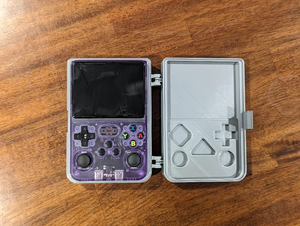
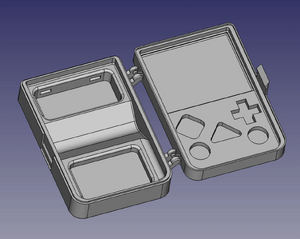

Reddit: Full Case Replacement for R36S - firezenk

Reddit: Improved Buttons - aggrohaze88


Reddit: 3D Printed Handheld Stand - dovgro


Reddit: PowerUp - 2BitePie


Reddit: Free R36S D-Pad Collection - firezenk

Internal WiFi Mods[edit]
Reddit: WiFi Mod


YouTube: R36s Internal WiFi Mod - Detailed Description and Device Teardown
Wi-Fi Module on the V21 Board[edit]

Reddit: Soldered WiFi Module on the V21 Board - u/alexbaiken

Rumble / Vibration Motor[edit]
Reddit: Rumble/Vibration in R36S - u/KST-aka-Giga_Chad


Reddit: Rumble Motor, Heatsink and Wrist Cord - u/paulosincos
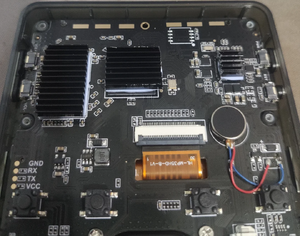

Reddit: R35S / R36S Vibration Motor Mod

YouTube: Enable RUMBLE / VIBRATION on R36S and R35S for $1!
Internal USB UART Console Mod[edit]
In a very hacker‑friendly move, the manufacturer provided test points for the USB D⁺/D⁻ data lines of the charging port on the PCB. This allows you to add internal USB hardware that can be connected to a PC by plugging a normal USB‑A‑to‑C cable into the charging port (which will still charge the R36S at the same time). The test points are on the “bottom” side of the PCB; you have to remove the board from the case to access them.
I used this to add a USB‑UART adapter that gives convenient access to the serial console (this will, for some people/situations, be more convenient than plugging in a USB keyboard or using Wi‑Fi + SSH).
I opted for a tiny USB‑UART module from AliExpress because it’s neater, but you can also remove the USB connector of any other one. Beware that the UART side must use 3.3 V signals (not 5 V). This pulls the 3.3 V power supply from the UART test points on the R36S (note that I set the jumper on the module to 3 V input), which has the downside that the USB device only registers on the host when the R36S is powered up. If I were to do this again, I would find a point to grab the 5 V supply from the charging port instead.


Heatsink Mods[edit]
The R36S handheld can get pretty toasty during marathon gaming sessions, but a few clever cooling tricks can keep it chill. Whether you add some copper sheets, thermal pads, and extra vent holes for passive heat‑spreading or an active cooling fan, these low‑cost mods make a big difference—and your games stay smooth without the sweat.
Active Cooling[edit]
Mod 1 - u/nikonair[edit]
Reddit: R36S heatsink mod and thermal performance testing.
Tools: Performance data collector for R36S consoles
Heatsink Mod[edit]


Performance Testing[edit]


Mod 2 - u/snacktivism[edit]
Reddit: Internal Active Cooling
Parts List:
- Heatsink: https://www.aliexpress.com/item/4001125438217.html
- Fan: https://www.aliexpress.com/item/1005009111701234.html
- 3D Printed Fan Duct: Metroidians


Passive Cooling[edit]
Mod 1 - u/Skromnjaga[edit]
Reddit: One week with R36S. Upgrades/mods/plans.

Mod 2 - u/kingElec[edit]
Reddit: Cheap and easy heatsink mod.


Mod 3 - u/kingElec[edit]
Reddit: Heatsink mod shown.


Mod 4 - u/gendou_neoretrogamer[edit]
Reddit: I installed a M2 heatsink on my R36S chipset. Fits perfect.


Display Changing Guide[edit]
This is a tutorial to change a broken screen. Device in the video is the R35S, but the process is almost the same for the R36S.
Misc Mods[edit]
Reddit: All white mod is coming together nicely - u/Mysterious-Still-787


Reddit: Console modded without spending a Dollar - u/Global_Guest_2183


Tape & Vinyl Mods[edit]
Reddit: The best R36S mod is black tape over the blue light - u/WWWWWWVWWWWWWWWWWWWV

Reddit: Tried my hand at a battery wrap design - u/sniper257

Cardboard Mods[edit]
Miniature Arcade Model Stand[edit]
The mod was free, but now it can only be purchased officially via etsy


Cardboard Box Grip[edit]
The mod was free, but now it can only be purchased officially via Etsy.


Reddit: Safety Cord - Anbernic RG Vita


3D Printed Mods[edit]
Reddit: R36S Clear Resin Buttons
Parts List: Printables

Reddit: The PlayStation Mod
Parts List: Cults3D

Paint Jobs[edit]
Reddit: Zelda Edition - u/TeaProfessional5670


Reddit: Multiple Mods - DimensionOk3304


Reddit: R36S Customized with Gold Details - jessikarochas


Reddit: R36S Lettering Paint Tutorial - danewlo


Highlight Buttons and Slots with Marker

USB Info[edit]
(WIP -- X8X-Foundries)
When wanting to use something like a USB Ethernet Dongle, USB Expansion Hub / "Dock", or other devices, it is generally recommended to have a POWERED USB-C hub between the intended device, and the R36S (the host device).
The R36S will want to solely act as a host, and not a slave device. At least, not without a proper "hub" interface for it to plug into. From current research, the "hub" chip in the R36S is barebones. As in, its mostly an interface to the SOC itself. While, yes, it does count AS a USB port, its a "raw" USB port. A Mass Storage Device will mount, a n*#@endo switch in UFS mode will mount, a hard drive will mount, as long as there is power provided.
If there is not a powered hub in front of the OTG port, it will "try" to act like a client device. However, the R36S's chipset is not designed to operate in this way.
An internal hub that solders directly to the WiFi pads, and the PD Data lines that are just beside the triggers, splitting from 2 internal to 4, would give an ungodly amount of expandability to developers. Parts can be found on Digikey or Mouser.
This should include most clones, generally.
Self Hubbed Ethernet (USB C)[edit]
If your USB-C Ethernet dingus is really neat, it will have its own USB hub chip. Some do, but I don't have info on that right now. All I know is of the 4 that I have, none of them pop up.
The USB-C to Ethernet Dongle, itself, will have its own hub chip though, and will always work without a USB Hub between the OTG and the network controller. Fancy chipsets will support PoE, and may be useable. This is currently unknown however.
Wifi Chips can still be connected to the internal pads, of course. However, I would wire a hub in front of it for good measure.
ALWAYS PLUG IN THE POWER ON THE R36S WHEN USING A SELF HUBBED DEVICE.
This should generally include clones.
Cooling Block Recommendations and General Fan Parts[edit]
If you need to have cooling, the thing to keep in mind is the RockChip 3326 is made to be cooled by the air moving around, by happenstance, in a wahing machine. With that being said, cooling is more dependant on Block Size than Fan Speed. Essentially, if you want to cut the hole anyways, get a taller block.
General recommendations from X8X are to use DDR1 OC blocks from Antec and AOpen. Theres also other sizes available, but the general design of 2-3MM thick block plate, and 20-30MM long fins, with a block big enough to cover the SOC block and the RK817, as long as the fins are long enough, any amount of airflow will work.
The current choice is a micro sized Delta fan, rated for 5V@0.08 Amps. These can be found in Dell PP03 inspiron laptops. This is a dead quiet fan, and palls off of the native 3.3V system in the R36S just fine.
Again, when the heat is spread over a ram OC block, untrimmed, built for DDR1 of all things, you don't hit 45C for long. Even on a PS1 game. With trimmings, you can play 60FPS Katamari for PSP in Armbian. No lag, other than USB interp by the CPU for the controller. This controller system needs work, imma tell ya.
R36S General Voltage Info[edit]
While soldering 5V tech, or plugging it in to USB C, works, the R36S itself is not a 5V system. It is a 3.3V system. Completely. So, were you to plug in something like a dell USB-C dock, you would overwhelm the system and see it crash without a powered hub to act as an "interpreter" for the R36S.
When using a "self hubbed" accessory, ALWAYS plug the R36S in.
This includes all clones.
Extreme Cooling Verification[edit]
In order to verify that the sensors in the X8X Test unit were accurate, the first stage of the cooling mod was finished with the Delta Fan, a hood for the block, and Z5 compound. The unit was placed into a freezer at the store, literally with ice cream in it. The unit hit -16C after about 40 minutes running Armbian on a 32GB U3 PNY/Toshiba Printed SD Card.
Other Projects at the Handhelds Wiki





