R36S Guides Tutorials HowTos: Difference between revisions
HandheldWiki (talk | contribs) m HandheldWiki moved page R36S Guides ‐ Tutorials ‐ How‐To's to R36S Guides Tutorials HowTos |
HandheldWiki (talk | contribs) No edit summary |
||
| Line 1: | Line 1: | ||
{{R36S Handheld Wiki page navigation new}}{{TOC|limit=2}} | {{R36S Handheld Wiki page navigation new}}{{TOC|limit=2}} | ||
{{SectionStyleStart}} | |||
= Backup your stock SD card = | = Backup your stock SD card = | ||
| Line 25: | Line 26: | ||
<br><br> | <br><br> | ||
{{SectionStyleEnd}} | |||
{{SectionStyleStart}} | |||
= Change the stock SD card = | = Change the stock SD card = | ||
{{R36S sd card}} | {{R36S sd card}} | ||
{{SectionStyleEnd}} | |||
{{SectionStyleStart}} | |||
= Read the FAQ on the r/R36S subreddit = | = Read the FAQ on the r/R36S subreddit = | ||
| Line 37: | Line 41: | ||
https://www.reddit.com/r/R36S/ | https://www.reddit.com/r/R36S/ | ||
{{SectionStyleEnd}} | |||
{{SectionStyleStart}} | |||
= Video Guides - Tutorials - How-To's = | = Video Guides - Tutorials - How-To's = | ||
| Line 67: | Line 72: | ||
<youtube width="400">https://www.youtube.com/watch?v=7PTCdCHzcQY</youtube> | <youtube width="400">https://www.youtube.com/watch?v=7PTCdCHzcQY</youtube> | ||
{{SectionStyleEnd}} | |||
{{SectionStyleStart}} | |||
= Written Guides - Tutorials - How-To's = | = Written Guides - Tutorials - How-To's = | ||
| Line 93: | Line 99: | ||
<br><br> | <br><br> | ||
{{SectionStyleEnd}} | |||
{{SectionStyleStart}} | |||
= Install ArkOS without a PC using Android Devices = | = Install ArkOS without a PC using Android Devices = | ||
{{Clickable button 2|Firmware Flashing Guide Using Android (R36S)|Firmware Flashing Guide Using Android (R36S)|class=mw-ui-progressive|style=border: 1px solid #ccc; transition: all 0.5s ease;}} | {{Clickable button 2|Firmware Flashing Guide Using Android (R36S)|Firmware Flashing Guide Using Android (R36S)|class=mw-ui-progressive|style=border: 1px solid #ccc; transition: all 0.5s ease;}} | ||
{{SectionStyleEnd}} | |||
{{Movetotop}} | {{Movetotop}} | ||
Revision as of 07:38, 29 May 2025
Backup your stock SD card
-
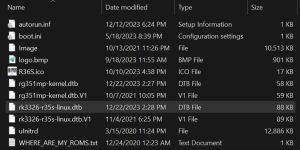
BOOT partition of a R36S with the original (V1) screen -
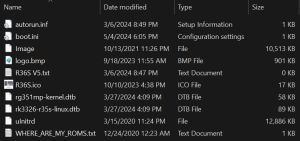
BOOT partition of a R36S with the panel 4 (V5) screen -
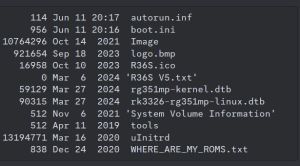
Different BOOT partition of a R36S with the panel 4 (V5) screen


This is the first step you should take before doing anything with your console. Save the contents of the microSD to your computer.
The 📄rk3326-r35s-linux.dtb or 📄rk3326-rg351mp-linux.dtb from the 📁BOOT partition is the most important file. You're probably going to need this to fix the problems that the 5 different screen / display panel versions often create (black screen issue).
My original SD card got corrupted before I could make a backup
R36S-Device Tree Blob - dtb files at GitHub
Panel 4 (V5) AmberELEC sound + FN button fix
I don't have rk3326-r35s-linux.dtb on my SD card
If you have a 📁EELEC partition or your files are 📄rk3326-evb-lp3-v12-linux.dtb or 📄rf3536k3ka.dtb, you got the EmuELEC Clone that is not compatible with standard ArkOS/AmberELEC.
Change the stock SD card
Read the FAQ on the r/R36S subreddit
-
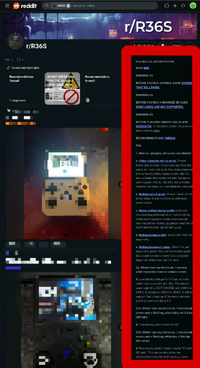
FAQ on r/R36S @reddit - image by u/spicymeatmemes

Video Guides - Tutorials - How-To's
Install ArkOS
Install ArkOS on 'clones'
Older Guides
Some of these are missing crucial steps for installing ArkOS on "Panel 4 devices", but are good guides for setting up emulators etc.
R35S/R36S Ultimate Setup Guide - ArkOS, Roms and BIOS (by Joey's Retro Handhelds)
R36S MASTER Starter Guide (by Javi Play Retro)
R36s guide for beginners in 2024 (by Jacek Rusin)
Install ArkOS using macOS
Written Guides - Tutorials - How-To's
A guide on getting started with you R36s and more (by AMSanchezC)
R35S/R36S Setup Guide (by Joey's Retro Handhelds)
R36S BASIC CONFIGURATION (by KuvZz)
R3XS Beginners Comprehensive Guide (by AeolusUX)
Flashing/Installation Guide for ArkOS v2.0 (by AeolusUX)
My R36S user manual (by Clitch77)
SPANISH Guia Definitiva De La Consola R36S (by ElVickz)
FRENCH R36S guide/wiki (by Daebis)
R36S Türkiye Topluluğu (by VicettiSun)
Other Projects at the Handhelds Wiki





