R36S Clones: Difference between revisions
HandheldWiki (talk | contribs) |
HandheldWiki (talk | contribs) |
||
| Line 141: | Line 141: | ||
!Filename/Info | !Filename/Info | ||
|- | |- | ||
| | |Community Maintained Image of ArkOS for the K36 Console and Similar Clones (R36S Clone, K36, R36 Pro, R36 Max, U8 Handheld, RX6H) release by AeolusUX | ||
|[https://github.com/AeolusUX/ArkOS-K36 GitHub] | |[https://github.com/AeolusUX/ArkOS-K36 GitHub] | ||
|Check the [https://www.reddit.com/r/R36S/comments/1hhn15r/arkos_for_k36_and_r36s_clones/ reddit thread] and the release notes on [https://github.com/AeolusUX/ArkOS-K36/releases GitHub] for the latest info. - '''a 2 SD card setup is not recommended!''' | |Check the [https://www.reddit.com/r/R36S/comments/1hhn15r/arkos_for_k36_and_r36s_clones/ reddit thread] and the release notes on [https://github.com/AeolusUX/ArkOS-K36/releases GitHub] for the latest info. - '''a 2 SD card setup is not recommended!''' | ||
|} | |} | ||
<div style="overflow-x:auto; max-width:100%;"> | |||
{| class="wikitable" style="width:100%; max-width:800px; border-collapse: collapse; font-family: Arial, sans-serif; font-size: 14px;" | |||
|- | |||
! colspan="2" style="background-color:#2c3e50; color:#ecf0f1; font-size: 1.5em; padding: 12px; text-align:center; border-radius: 8px 8px 0 0;" | ArkOS for EmuELEC Clone Devices | |||
|- | |||
| colspan="2" style="text-align:center; padding: 15px; background-color:#f9f9f9;" | | |||
[[File:345420723-1ba003f0-4926-4add-885b-67c41cc1c1f6.png|400px]] | |||
|- | |||
! style="width: 50%; background-color:#ecf0f1; padding: 15px; font-weight: bold; text-align: center; white-space: normal;" | Description | |||
| style="padding: 15px; white-space: normal;" | [https://github.com/AeolusUX/ArkOS-K36 Community Maintained Image of ArkOS for the K36 Console and Similar Clones (R36S Clone, K36, R36 Pro, R36 Max, U8 Handheld, RX6H) release by AeolusUX] | |||
|- | |||
! style="width: 30%; background-color:#ecf0f1; padding: 10px; font-weight: bold; white-space: normal;" | Latest version | |||
| style="padding: 10px; white-space: normal;" | [https://github.com/AeolusUX/ArkOS-K36 https://raster.shields.io/github/v/release/AeolusUX/ArkOS-K36.png] | |||
|- | |||
! style="width: 50%; background-color:#ecf0f1; padding: 15px; font-weight: bold; text-align: center; white-space: normal;" | Download Link | |||
| style="padding: 15px; white-space: normal;" | [https://github.com/AeolusUX/ArkOS-K36 GitHub] | |||
|- | |||
! style="width: 50%; background-color:#ecf0f1; padding: 15px; font-weight: bold; text-align: center; white-space: normal;" | Info | |||
| style="padding: 15px; white-space: normal;" | Check the [https://www.reddit.com/r/R36S/comments/1hhn15r/arkos_for_k36_and_r36s_clones/ reddit thread] and the release notes on [https://github.com/AeolusUX/ArkOS-K36/releases GitHub] for the latest info. - '''a 2 SD card setup is not recommended!''' | |||
|} | |||
</div> | |||
==== Black Screen / No Sound Fix / dtb Files ==== | ==== Black Screen / No Sound Fix / dtb Files ==== | ||
Revision as of 01:30, 29 May 2025
EmuELEC Clones ⚠️

First spotted: 08 / 2024
Avoid buying a clone
Check the R36S Buying Guide for
- links to the cheapest listings
- trusted sellers
- general AliExpress advice/tips
- cheap accessories
- similar and better handhelds
| ✅ Trusted Stores AliExpress |
|---|
| ✅ 001 Ali Choice Store |
| ✅ BOYHOM Store |
| ✅ Factory Game Direct Store |
| ✅ Trusted Stores Temu |
|---|
| ✅ WUDS Games on Temu |
| ✅ Trusted Stores Other Sites |
|---|
| ✅ Blidinner Store Amazon.co.uk |
| ✅ Shenzhen Qbuy Technology on Alibaba |
| ✅ Xiaoyu USA branch on Amazon |
| ✅ Alphawolf Supply Co. on Shopee |
| ⛔️ Clone-Reported Stores - AliExpress |
|---|
| ⛔️ Adiodo Game Factory Store |
| ⛔️ DomiShop Store |
| ⛔️ FORYOUD Store |
| ⛔️ GAMINJA Global Store |
| ⛔️ Global Game Direct Store |
| ⛔️ HIFUN GAME Store |
| ⛔️ KYVG Store |
| ⛔️ Merak Game Store |
| ⛔️ Mizar Game Store |
| ⛔️ ProQueen Store |
| ⛔️ Retro Games Console Store |
| ⛔️ Retro Game Supermaket Store |
| ⛔️ Shop1105078442 Store |
| ⛔️ Shop1104161362 Store |
| ⛔️ SJUJ Official Store |
| ⛔️ SUPER FUN GAME Store |
| ⛔️ Super Game Console Store |
| ⛔️ TT Super Player Store |
| ⛔️ Shop1104211046 Store |
| ⛔️ Uncharted GAME Store |
| ⛔️ YYDZKJ Store |
| ⛔️ Clone-Reported Stores - Temu |
|---|
| ⛔️ Baijiai on Temu |
| ⛔️ Discount CC shop on Temu |
| ⛔️ FengYuanPreferred on Temu |
| ⛔️ Fly to the sky technology on Temu |
| ⛔️ HHC on Temu |
| ⛔️ LeYiXia on Temu |
| ⛔️ Natural beauty corporate on Temu |
| ⛔️ Staco Digital on Temu |
| ⛔️ Suier on Temu |
| ⛔️ YingShou on Temu |
| ⛔️ YLW Global on Temu |
| ⛔️ YUYIU on Temu |
| ⛔️ Clone-Reported Stores - Others |
|---|
| ⛔️ BSTXY on Amazon |
| ⛔️ D-MuXue on Amazon |
| ⛔️ focus_on_mall on eBay |
| ⛔️ Game Global Store |
| ⛔️ LEO BUY SHOP |
| ⛔️ Shenzhen Lanxinda Digital on Alibaba |
| ⛔️ Shenzhen Miratech on Alibaba |
| ⛔️ Shenzhen Smart Concept Electronics on Alibaba |
| ⛔️ shopgamelab.com |
| ⛔️ shop.mashable.com - Retropian brand |
1 If you want to support this wiki, you can buy a device through one of these "affiliate" links. The price won't increase for you. Part of the recieved money will be used for aquiring new devices, testing and documenting them for the handheld community.
How to spot a clone
Known Software and Hardware differences and how to spot one of the EmuELEC clone variants:
- Can boot without SD card(s) - Shows error message "Can't find any sytems"
- Only one RAM chip instead of two (you can see differences without opening the device if you have a transparent R36S)
- Different dtb files on the SD card
- rk3326-evb-lp3-v12-linux.dtb
- rf3536k4ka.dtb
- rf3536k3ka.dtb
- Standard ArkOS/AmberELEC not working (black screen and flashing red light)
- Runs EmuELEC ES V4.7 (same firmware as the Gaminja/Kinhank K36)
- EMUELEC or EEROMS partition instead of EASYROMS
- "ArkOS 2.0 (release date)" loading message is missing during boot
- Charging animation when the device is turned off
- Different bootup sequence
- No wifi option - does not support wifi dongles
- FN button is mapped to the Y button (software problem?)
- Original has larger/thicker volume grills. The fake one has thinner volume grills
- Some clones have buttons with different fonts like a Crooked/italic X button or very thin letters
- Retroarch System Information shows 497mb of system memory (retroarch > back to main menu > information > system)
EmuELEC clone variant with internal storage
- The OS is on the onboard-storage(eMMC)
- Not compatible with the K36 or ArkOS for clones firmware image
- Weaker RK3128 SoC instead of RK3326
- How to add games
- R36S Internal Files (cores, gamelists)
Teardown Gallery
- Here's Teardown of one of the EmuELEC clone variants with one RAM chip (by andreyq123): https://postimg.cc/gallery/HkVBDgG
-
 Image by L31x9H from Discord #gameconsole_r36s_etc - Note: some clones have the same board as the original R36S version
 -
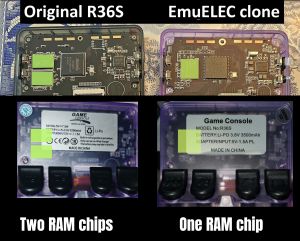 highlighted RAM chips
 -
 KMQNW000SM-B316 - Source: Reddit
 -
 KMQNW000SM-B316 - Source: Reddit
 -
 KMQ7X000SA-B315 - Source: Discord
 -
 KMQ7X000SA-B315 - Source: Discord
 -
 KMQ72000SM-B316 - Source: Reddit
 -
 KMQ72000SM-B316 - Source: Reddit
 -
 KMQD60013M-B318 - Source: Reddit
 -
 Clone with 2 ram chips - Source: Discord - RF35XE-MB V1.1_20240508 - K36 has the internal name of "RF3500KG"
 -
 BOOT partition of one of the R36S EmuELEC clones
 -
 Image by Striike from Discord #gameconsole_r36s_etc (Retro Handhelds) - zoomed in on the crooked X button
 -
 Original (Old SKU) vs Clone X button - source
 -
 BOOT partition of one of the R36S EmuELEC clones - Image by Send_it_96 from reddit
 -
 Looks like a normal R36S but it's a clone - Image by FiveMileDammit from reddit
 -
 Almost no options in the menu - Image by FiveMileDammit from reddit
 -
 One of the clone variants - "ArkOS 2.0 (release date)" loading message is missing during boot, God of War logo during boot sequence, EPIC-CODY is standard theme - (video at discord)
 -
 EMUELEC ES V4.7 - source
 -

-
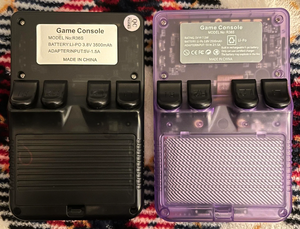
-
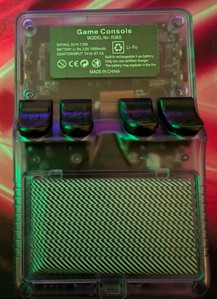 You can see through the plastic that it has only 1 RAM chip - source
 -
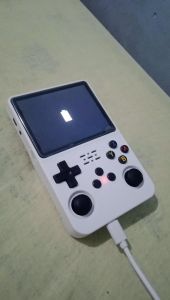 Charging animation when the device is turned off - source
 -
 slightly different bootlogo (left=real r36s - right=emuelec clone) - source
 -
 EmuELEC clone boot logo differences: Font, additional "PLEASE WAIT LOADING..." text, brownish background, slightly squeezed image
 -
 Button and dpad differences - More info at this reddit thread
 -
 R36S EmuELEC clone with RK3128 - source


.jpeg)


Common problems
The stock SD card is as bad as on a regular R36S and tends to corrupt very fast.
Error Message During Boot - Can't find any sytems
Solution: Install one of the available custom firmwares to a new SD card, or follow the video guide below.


Stuck During Boot
Solution: Install one of the available custom firmwares to a new SD card.


Red blinking light during boot
This happens when you install the standard (or community maintained) ArkOS custom firmware.
Solution: Install/flash one of the clone specific custom firmware from below.
Custom Firmware for the EmuELEC Clone
-

Image by Slowpokefarm - R36S EmuELEC clone running the Kinhank K36 firmware -

Image by mattRlive - K36 running ArkOS firmware


ArkOS
ArkOS Custom Firmware is available for these clones since December 19th, 2024. More info and release notes are availablle at this reddit discussion thread: https://www.reddit.com/r/R36S/comments/1hhn15r/arkos_for_k36_and_r36s_clones/
-

ArkOS logo

| Description | Download Link | Filename/Info |
|---|---|---|
| Community Maintained Image of ArkOS for the K36 Console and Similar Clones (R36S Clone, K36, R36 Pro, R36 Max, U8 Handheld, RX6H) release by AeolusUX | GitHub | Check the reddit thread and the release notes on GitHub for the latest info. - a 2 SD card setup is not recommended! |
| ArkOS for EmuELEC Clone Devices | |
|---|---|
|
| |
| Description | Community Maintained Image of ArkOS for the K36 Console and Similar Clones (R36S Clone, K36, R36 Pro, R36 Max, U8 Handheld, RX6H) release by AeolusUX |
| Latest version | 
|
| Download Link | GitHub |
| Info | Check the reddit thread and the release notes on GitHub for the latest info. - a 2 SD card setup is not recommended! |
Black Screen / No Sound Fix / dtb Files
Replace your .dtb file on the boot partition. Here are a few different ones. They are also included (on the BOOT partition) with the ArkOS version for K36 and R36S Clones by AeolusUX.
- Device Tree Files Repository for the K36 and similar clones
- rf3536k4ka.dtb #1
- rf3536k4ka.dtb #2
- rf3536k4ka.dtb #3 (use this if you have no sound)
- rf3536k3ka.dtb #4 (temu internal emmc)
ArkOS
| Description | Download Link | Filename/Info |
|---|---|---|
| ArkOS version for the R36MAX / R36PRO | Google Drive | S0945_RF3536K4KA_YP2024110012_R36MAX_202411131854_ArkOS.img.gz - Source - outdated
|
No Sound Fix
Go to Ports and click on "audio fix permanent".
Can't save games / Stuck at 0%
Use only 1 microSD card for the OS + roms. A 2 card setup does not work correctly on ArkOS for clones.
ROCKNIX
Official ROCKNIX is now working on these clones. Use the "b" version from the download page.
| ROCKNIX | |
|---|---|
|
| |
| Description | Official ROCKNIX is now working on these clones. Use the "b" version from the download page. |
| Download Link | Tool to patch the stock dtb file |
| Filename / Info | Use the "B" version from the nightly release page (ROCKNIX-RK3326.aarch64-20250430-b.img.gz) and edit your dtb file with the tool - ROCKNIX Wiki |

ROCKNIX mod
| ROCKNIX mod | |
|---|---|
| Description | Modded version of ROCKNIX that works on the R36S clone, R36PRO, R36MAX and MyMini. |
| Download Links | Origin of article |
| Filename / Info | readme and how to install - ROCKNIX Wiki |
RetrOS
| RetrOS | |
|---|---|
|
| |
| Description | New hybrid custom firmware for R36S clones. |
| Download Links | RetrOS @ GitHub |
| Filename / Info | RetrOS-preview1.img – early development build |

EmuELEC
Original and modified K36 EmuELEC firmware images. Most of these custom firmwares run a little slower and have limited options compared to ArkOS or AmberELEC.
| Description | Download Link | Filename/Info |
|---|---|---|
| Modified EmuELEC 4.8 Beta Firmware posted by trananhquan (November 3, 2024) | Google Drive | EmuELEC-R36SClone.aarch64-4.8-TEST-04212024-chi.img.gz - updated RetroArch cores - working internet connection via ethernet adapter - Portmaster working
|
| K36S Stock Firmware (EmuELEC 4.7) posted by AeolusUX (October 15, 2024) | Google Drive | EmuELEC-RF3500KG.aarch64-4.7-K36.20240823143713_EXPAND_EEROMS.img.xz - Unlocked emulationstation options - FN button now working correctly - You have to expand the EEROMS partition manually after flashing
|
| K36S Stock Firmware (EmuELEC 4.7) with unlocked options | Google Drive - MediaFire - MEGA | HuaKeWei_RF3500KG_K36_ZED2024050006_EE4.7_Rlease_20240823.img.gz
|
| K36S Stock Firmware (EmuELEC 4.7) | Google Drive | K36-Stock-EmuELEC.img.xz
|
| R36S Modified Firmware (Temu Clone EmuELEC 4.7) | MEGA | RetrOS-preview1.img.xz, stock kernel may have better milage with analog sticks that K36, defaults to two cards, 32gb setup expand 1st card if you want one card https://github.com/dmikey/retros |
| R36S EmuELEC clone dtb file | Google Drive - MediaFire | rk3326-evb-lp3-v12-linux.dtb
|
| R36S EmuELEC clone dtb file (alternative) | MediaFire | rk3326-evb-lp3-v12-linux.dtb
|
Mount TF2 roms SD card on the EmuELEC Clone
If you have problems with getting roms to show from the 2nd SD card follow the steps in this video (thanks to dandaman73).
There’s a 2 step process mount and hard reboot
File:IMG 3675.mp4
Other
There are also modified UnofficialOS and AmberELEC Firmware versions available that can boot up the device, but have a few issues like no sound, general unstability and are not recommended to use. Source: KinHank K36 discord channel
| Description | Download Link | Filename/Info | |
|---|---|---|---|
| UnofficialOS Firmware with EmuELEC kernel | Google Drive | not recommended! UnofficialOS-RGB20S.aarch64-20230208.img.gz
|
|
| AmberELEC Firmware with EmuELEC kernel | Google Drive | not recommended! AmberELEC-RG351V.aarch64-20230203.img.gz
|
|
| AmberELEC pre-release Firmware with EmuELEC kernel | Google Drive | not recommended! linux only - copy game and bios to roms not roms2 - speaker is not working - mupen64plus cannot map buttons - not recommended to use AmberELEC-RG351MP.aarch64-prerelease-20240912_1759.img.gz
|
Manufacturers
Shenzhen Xumeng Technology Co., Ltd
R36S Clone #1 (R35S+ or R36S+) ✅
This is a "good" clone version. It can run the standard ArkOS version. Compared to the EmuELEC clone, this type is very rare.
First spotted: 06 / 2024
Update 09 / 2024: Not available anymore
Backlabel is R35S+ or R36S+
Known differences:
- The holes around the joysticks are smaller
- Labels on the buttons are thinner
- Different joysticks
- Original screen version
- The buttons feel different
- Some have a green LED light instead of blue
Sources:
It's unclear where/how those clones are sold. If you look at "R36S" listings on aliexpress, and check the review pics, you can spot a few of these clones there. These clones are also found in the reviews from 3C MOKER Store (July 2024).
-

-

-

holes around the joysticks -

Labels on the buttons -

-

green LED


No TF2 roms card slot Clone ✅
This is a "good" clone version. It can run the standard ArkOS version. Compared to the EmuELEC clone, this type is very rare.
First spotted: 10 / 2024
Known differences:
- no TF2 roms card slot
- no removeable battery cover
- no label on the back buttons
- color on the front buttons missing
- latest ArkOS is working fine


Internal Storage Clone ⚠️
Temu clones often come with internal storage and one ram chip. These devices typically have 512Mb of ram and a 512Mb swap partition on the MMC. The MMC is 4Gb in size.
-

partition layout showing 512Mb swap

Round D-pad Clone ✅
This is a "good" clone version. It can run the standard ArkOS version. Compared to the EmuELEC clone, this type is very rare.
First spotted: 12 / 2024
Known differences:
- Rounded D-pad
- New box with an Assassins Creed image
- No indentation for the letters in the face buttons
Sources:
- https://discord.com/channels/741895796315914271/1185499524257558600/1329310414827163668
- https://discord.com/channels/741895796315914271/1185499524257558600/1318782149767331840


R36S V2.5 ⚠️
First spotted: 04 / 2025
It's a gb350 clone. It uses the same OS as the g350 and sf3000. So my guess is it uses the same soc as the sf3000.
https://www.reddit.com/r/R36S/comments/1kbpz9y/comment/mtqo15i/?context=3


Known differences:
- No visible RAM chips
- Different SoC chip
- NANYA NT5CB128M16HP-DI 2GB RAM chip
- maybe unsoldered mini-hdmi port?


G80C-MB V1.1-20250319
-

Image source: baidu R36S thread

Other Projects at the Handhelds Wiki





