R36S Clones: Difference between revisions
HandheldWiki (talk | contribs) →Fakes: added PS101_MB_V1.2 |
R36Simpleton (talk | contribs) m →Why clones are bad: date update |
||
| (42 intermediate revisions by 12 users not shown) | |||
| Line 28: | Line 28: | ||
* Most clone firmware versions still have problems with a dual SD card setup | * Most clone firmware versions still have problems with a dual SD card setup | ||
* Lots of reports about audio output issues and inverted controls | * Lots of reports about audio output issues and inverted controls. | ||
* There are clones with lesser ram - 512MB instead of 1GB | * There are clones/fakes with lesser ram - 512MB instead of 1GB. | ||
* There are clones with the weaker RK3128 chip instead of RK3326 | * There are clones/fakes with the weaker RK3128 chip instead of RK3326. | ||
* There are clones with completely different internals (even weaker than RK3128) and | * There are clones/fakes with completely different internals (even weaker than RK3128) and as of May 2026 no custom firmware support. | ||
* Lots of people struggling to get the G80 mainboard clones working with custom firmware | * Lots of people struggling to get the G80 mainboard clones working with custom firmware. | ||
* If you lost your SD card, you need to try | * On ArkOS4Clone on certain V20 clones, the speaker may overvolt, permanently damaging it. | ||
* No compatibility with AmberELEC/PAN4ELEC, LineageOS (Android), Multiboot, Ambian | * If you lost your SD card, you need to try lots of different screen panel files (.dtb files) | ||
* No compatibility with AmberELEC/PAN4ELEC, LineageOS (Android), Multiboot, Ambian, etc. | |||
* Worse hardware parts are used on some clone models (Worse screen and brightness, louder shoulder buttons + they are very loose, louder L3/R3, Power and volume buttons are harder to press) | * Worse hardware parts are used on some clone models (Worse screen and brightness, louder shoulder buttons + they are very loose, louder L3/R3, Power and volume buttons are harder to press) | ||
| Line 135: | Line 136: | ||
<youtube width="400">https://www.youtube.com/watch?v=WQ3tfmzPN0s</youtube> | <youtube width="400">https://www.youtube.com/watch?v=WQ3tfmzPN0s</youtube> | ||
<br> | |||
<span id="ArkOS4clone"></span> | <span id="ArkOS4clone"></span><span id="arkOS4clone"></span></span><span id="arkos4clone"></span> | ||
'''ArkOS4clone''' | '''ArkOS4clone''' | ||
| Line 142: | Line 144: | ||
<youtube width="400">https://www.youtube.com/watch?v=0P97HaLOmVA</youtube> | <youtube width="400">https://www.youtube.com/watch?v=0P97HaLOmVA</youtube> | ||
<br> | |||
<span id="dArkOSRE"></span> | |||
'''dArkOSRE''' | |||
{{CFW:dArkOSRE}} | |||
<br> | |||
<span id="dArkOS"></span> | <span id="dArkOS"></span> | ||
'''dArkOS''' | '''dArkOS''' | ||
{{CFW:dArkOS}} | {{CFW:dArkOS}} | ||
<youtube width="400">https://www.youtube.com/watch?v=6vcQQ-_dfJU</youtube> | <youtube width="400">https://www.youtube.com/watch?v=6vcQQ-_dfJU</youtube> | ||
<br> | |||
<span id="ArkOS K36"></span> | <span id="ArkOS K36"></span> | ||
| Line 160: | Line 168: | ||
{{CFW:ArkOS - K36}} | {{CFW:ArkOS - K36}} | ||
<br> | |||
<span id="ROCKNIX"></span> | <span id="ROCKNIX"></span> | ||
| Line 173: | Line 182: | ||
<youtube width="400">https://www.youtube.com/watch?v=zt159TCG4f8</youtube> | <youtube width="400">https://www.youtube.com/watch?v=zt159TCG4f8</youtube> | ||
<br> | |||
<span id="UnofficialOS"></span> | <span id="UnofficialOS"></span> | ||
| Line 412: | Line 422: | ||
One of the first R36S clones on the market. Known for the sticker with the board number. | One of the first R36S clones on the market. Known for the sticker with the board number. | ||
EmuELEC clone with a '''single RAM chip (1GB)''' and '''eMMC storage'''. Follow this tutorial to start the firmware on the eMMC: https://www.youtube.com/watch?v=jL8PdjGYeVE | |||
Firmware compatibility: | |||
[[R36S_Clones#ArkOS_K36|ArkOS K36]]: Works without changing dtb files. | |||
[[R36S_Clones#ArkOS4clone|ArkOS4clone]]: Select "Game Console HG36 (HG3506)" in the dtb selector tool. | |||
[[R36S_Clones#ROCKNIX|Rocknix]]: Use this tool to generate your dtbo file using the stock dtb file [https://rocknix.gosk.in/dtbo/ DTB overlay generator for Rocknix]. | |||
Stock dtb file: https://github.com/Vi-K36/EE-Clones-DTB/tree/main/HG36%20-%20HG3506/Stock | |||
<div> | <div> | ||
| Line 429: | Line 447: | ||
Temu clones often come with internal storage and one ram chip. These devices typically have 512Mb of ram and a 512Mb swap partition on the MMC. The MMC is 4Gb in size. | Temu clones often come with internal storage and one ram chip. These devices typically have 512Mb of ram and a 512Mb swap partition on the MMC. The MMC is 4Gb in size. | ||
<div | <div> | ||
<li style="display: inline-block; vertical-align: top;"> [[File:Partition_layout.jpg|none|400px|partition layout showing 512Mb swap]] </li> | <li style="display: inline-block; vertical-align: top;"> [[File:Partition_layout.jpg|none|400px|partition layout showing 512Mb swap]] </li> | ||
</div> | |||
{{SectionStyleEnd}} | {{SectionStyleEnd}} | ||
| Line 441: | Line 459: | ||
First spotted: 05 / 2025 | First spotted: 05 / 2025 | ||
EmuELEC clone '''without''' eMMC storage. | EmuELEC clone '''without''' eMMC storage. Firmware compatibility: | ||
[[R36S_Clones#ArkOS_K36|ArkOS K36]]: Use [https://github.com/AeolusUX/K36-DTB/tree/main/Panel%208 Panel 8] dtb files. | |||
[[R36S_Clones#dArkOSRE|dArkOSRE]]: [https://github.com/southoz/dArkOS-G80CA-RE dArkOSRE] supporting both Panel 8 (default) and [https://github.com/southoz/dArkOSRE-R36?tab=readme-ov-file#supported-systems Panel 9] - See [https://github.com/southoz/dArkOS-G80CA-RE/wiki dArkOSRE Wiki] for installation instructions. | |||
[[R36S_Clones#ArkOS4clone|ArkOS4clone]]: Select "R36S Clone Type 2 without amplifier" in the dtb selector tool. | |||
<div> | <div> | ||
| Line 454: | Line 476: | ||
First spotted: 05 / 2025 | First spotted: 05 / 2025 | ||
EmuELEC clone '''without''' eMMC storage. | EmuELEC clone '''without''' eMMC storage. Firmware compatibility: | ||
ArkOS | [[R36S_Clones#ArkOS_K36|ArkOS K36]]: Use [https://github.com/AeolusUX/K36-DTB/tree/main/Panel%208 Panel 8] or [https://github.com/AeolusUX/K36-DTB/tree/main/Panel%209 Panel 9] dtb files. ([https://www.dropbox.com/scl/fo/utn5woz99540fs4gasaf0/AIxhV1qjyriPQS4saQ6VG9A?rlkey=num1jltfhs92133z4vh3pfuge&e=1&st=zgjmsn5z&dl=0 alternative download link]) | ||
[[R36S_Clones#dArkOSRE|dArkOSRE]]: [https://github.com/southoz/dArkOS-G80CA-RE dArkOSRE] supporting both Panel 8 (default) and [https://github.com/southoz/dArkOSRE-R36?tab=readme-ov-file#supported-systems Panel 9] - See [https://github.com/southoz/dArkOS-G80CA-RE/wiki dArkOSRE Wiki] for installation instructions. | |||
<div> | <div> | ||
| Line 472: | Line 494: | ||
ArkOS with fixed controls: [https://github.com/southoz/ArkOS-G80CA-MB ArkOS-G80CA-MB] - [https://github.com/southoz/ArkOS-G80CA-MB/wiki Controller Mappings] | ArkOS with fixed controls: [https://github.com/southoz/ArkOS-G80CA-MB ArkOS-G80CA-MB] - [https://github.com/southoz/ArkOS-G80CA-MB/wiki Controller Mappings] | ||
[[R36S_Clones#dArkOSRE|dArkOSRE]]: [https://github.com/southoz/dArkOS-G80CA-RE dArkOSRE] supporting both Panel 8 (default) and [https://github.com/southoz/dArkOSRE-R36?tab=readme-ov-file#supported-systems Panel 9] - See [https://github.com/southoz/dArkOS-G80CA-RE/wiki dArkOSRE Wiki] for installation instructions. | |||
<div> | <div> | ||
| Line 483: | Line 505: | ||
First spotted: 01 / 2026 | First spotted: 01 / 2026 | ||
[[R36S_Clones#dArkOSRE|dArkOSRE]]: [https://github.com/southoz/dArkOS-G80CA-RE dArkOSRE] supporting both Panel 8 (default) and [https://github.com/southoz/dArkOSRE-R36?tab=readme-ov-file#supported-systems Panel 9] - See [https://github.com/southoz/dArkOS-G80CA-RE/wiki dArkOSRE Wiki] for installation instructions. | |||
<div> | <div> | ||
| Line 492: | Line 514: | ||
== Clones with 2 RAM Chips == | == Clones with 2 RAM Chips == | ||
=== RF35XE-MB V1.1_20240508 === | |||
Confirmed working with [[R36S_Clones#ArkOS_K36|ArkOS K36]] and [[R36S_Clones#ArkOS4clone|ArkOS4clone]] (choose Type 3 Clone). | |||
<div> | |||
<li style="display: inline-block; vertical-align: top;"> [[File:RF35XE-MB V1.1_20240508 mainboard.jpeg|thumb|none|400px|RF35XE-MB V1.1_20240508 mainboard - [https://www.reddit.com/r/R36S/comments/1rgzmgs/r36s_clone_wont_run_any_3d_cores_on_arkos/ image source]]] </li> | |||
</div> | |||
=== G80D-MB V1.0-20250609 === | === G80D-MB V1.0-20250609 === | ||
| Line 538: | Line 568: | ||
It also boots with Clone Panel 5 files, but has no sound. | It also boots with Clone Panel 5 files, but has no sound. | ||
Users are also reporting compatibility with [[R36S_Clones#arkos4clone|arkOS4clone]] and choosing "Type 2 wirhout amplifyer" in the dtb selector tool. | |||
'''Known sellers:''' | '''Known sellers:''' | ||
* SUPER FUN GAME Store | * SUPER FUN GAME Store | ||
* Microcenter | |||
'''Differences compared to a standard R36S''' | '''Differences compared to a standard R36S''' | ||
| Line 562: | Line 595: | ||
== R36S-V20 2025-05-18 == | == R36S-V20 2025-05-18 == | ||
First spotted: 09 / 2025 | First spotted: 09 / 2025 | ||
{{Warning |ArkOS4Clone seems to work ok, but there is a bug that can overvolt the speaker output and fry the speaker on V20 clones – [https://www.reddit.com/r/R36S/comments/1sf3i02/comment/oeuqlbn/ source #1] - [https://www.reddit.com/r/R36S/comments/1no7sw1/comment/ohbqmyd/ source #2]}} | |||
There are two versions of this clone with different panel, battery, and button mappings within the OG Kernel 5.10 dtb files. | There are two versions of this clone with different panel, battery, and button mappings within the OG Kernel 5.10 dtb files. | ||
| Line 579: | Line 612: | ||
The best choice for the device is the K36 Community Firmware, as the dtb files preserve advanced RAM timings, allowing the kernel to remap the RAM to 1GB. | The best choice for the device is the K36 Community Firmware, as the dtb files preserve advanced RAM timings, allowing the kernel to remap the RAM to 1GB. | ||
{{Quote|New LPDDR3 clone — this is most likely a re-marked Nanya NT6CL256M32-H1* LPDDR3. The ridiculous part is that ArkOS only reports 719 MB.}} | {{Quote|New LPDDR3 clone — this is most likely a re-marked Nanya NT6CL256M32-H1* LPDDR3. The ridiculous part is that ArkOS only reports 719 MB.}} | ||
| Line 604: | Line 636: | ||
== R36S-V20 2025-09-18 == | == R36S-V20 2025-09-18 == | ||
First spotted: 12 / 2025 | First spotted: 12 / 2025 | ||
{{Warning |ArkOS4Clone seems to work ok, but there is a bug that can overvolt the speaker output and fry the speaker on V20 clones – [https://www.reddit.com/r/R36S/comments/1sf3i02/comment/oeuqlbn/ source #1] - [https://www.reddit.com/r/R36S/comments/1no7sw1/comment/ohbqmyd/ source #2]}} | |||
Compatible with ArkOS4Clone. RK3326, RK817, with Nanya NT6CL256T32BM-H2 LPDDR3 DRAM (896MB total). | Compatible with ArkOS4Clone. RK3326, RK817, with Nanya NT6CL256T32BM-H2 LPDDR3 DRAM (896MB total). | ||
| Line 625: | Line 657: | ||
== R36S-V12 2023-08-18 == | == R36S-V12 2023-08-18 == | ||
There are multiple clone mainboards with the R36S-V12 2023-08-18 number, just like the first [[R36S_Overview#R36S-V12_2023-08-18|original R36S]] had. | |||
Variant 1: Single RAM chip clone, with eMMC (KMF720012M-B214) [https://www.reddit.com/r/R36S/comments/1o2aiw8/i_found_a_new_r36s_clone/ Reddit discussion] | Variant 1: Single RAM chip clone, with eMMC (KMF720012M-B214) [https://www.reddit.com/r/R36S/comments/1o2aiw8/i_found_a_new_r36s_clone/ Reddit discussion] | ||
dArkOS: [https://github.com/southoz/dArkOS-G80CA-RE dArkOSRE] with verified [https://github.com/southoz/ | dArkOS: [https://github.com/southoz/dArkOS-G80CA-RE dArkOSRE] with verified [https://github.com/southoz/dArkOSRE-R36?tab=readme-ov-file#supported-systems Variant 1] dtb files - See [https://github.com/southoz/dArkOS-G80CA-RE/wiki dArkOSRE Wiki] for installation instructions. | ||
<div> | <div> | ||
| Line 636: | Line 670: | ||
Variant 2: Single RAM chip clone (Micron D9SRZ, 1GB RAM, no eMMC). Comes preinstalled with some old version of custom ArkOS. Can be upgraded to ArkOS4Clone ver 2026-01+, which works great (select DTB as: "Type 2 Without Amplifier"). | Variant 2: Single RAM chip clone (Micron D9SRZ, 1GB RAM, no eMMC). Comes preinstalled with some old version of custom ArkOS. Can be upgraded to ArkOS4Clone ver 2026-01+, which works great (select DTB as: "Type 2 Without Amplifier"). | ||
dArkOS: [https://github.com/southoz/dArkOS-G80CA-RE dArkOSRE] with verified [https://github.com/southoz/ | dArkOS: [https://github.com/southoz/dArkOS-G80CA-RE dArkOSRE] with verified [https://github.com/southoz/dArkOSRE-R36?tab=readme-ov-file#supported-systems Variant 2] dtb files - See [https://github.com/southoz/dArkOS-G80CA-RE/wiki dArkOSRE Wiki] for installation instructions. | ||
<div><li style="display: inline-block; vertical-align: top;"> | <div><li style="display: inline-block; vertical-align: top;"> | ||
[[File:R36S-V12 2023-08-18 variant 2.jpg|thumb|R36S-V12 2023-08-18 variant 2]]</li> | [[File:R36S-V12 2023-08-18 variant 2.jpg|thumb|R36S-V12 2023-08-18 variant 2]]</li> | ||
</div> | |||
Variant 3: Single RAM chip clone, with eMMC (Sk Hynix, H9TQ32A4GTMCUR-KUM 512MB RAM / 4GB eMMC NAND). Different Panel to Variant 1 and Variant 2 | |||
total used free shared buff/cache available | |||
Mem: 384Mi 111Mi 3.8Mi 3.8Mi 282Mi 272Mi | |||
Swap: 0B 0B 0B | |||
dArkOS: [https://github.com/southoz/dArkOS-G80CA-RE dArkOSRE] with verified [https://github.com/southoz/dArkOSRE-R36?tab=readme-ov-file#supported-systems Variant 3] dtb files - See [https://github.com/southoz/dArkOS-G80CA-RE/wiki dArkOSRE Wiki] for installation instructions. | |||
<div><li style="display: inline-block; vertical-align: top;"> | |||
[[File:R36S-V12 202023-08-18 Variant 3.jpg|thumb|alt=R36S-V12 202023-08-18 Variant 3|R36S-V12 202023-08-18 Variant 3]] | |||
</div> | |||
One of the first clones from September 2024 also had a R36S-V12 2023-08-18 marking. | |||
<div> | |||
<li style="display: inline-block; vertical-align: top;"> [[File:R36S V12 2023-08-18 clone mainboard from september 2024.jpg|thumb|none|400px|[https://www.reddit.com/r/R36S/comments/1fa1rle/its_a_clone_r36s_motherboard_hope_it_help_some_one/?share_id=R1dLfFoQRDE3ht0gDgE_m&utm_medium=ios_app&utm_name=ioscss&utm_source=share&utm_term=1 image source]]] </li> | |||
</div> | </div> | ||
{{SectionStyleEnd}} | {{SectionStyleEnd}} | ||
| Line 661: | Line 712: | ||
* No custom firmware support | * No custom firmware support | ||
* Weaker [[:Category:RK3128|RK3128]] | * Weaker [[:Category:RK3128|RK3128]], [[:Category:Allwinner A33|Allwinner A33]] or [[:Category:MediaTek MT6592V|MTK6572V]] SoC instead of [[:Category:RK3326|RK3326]] | ||
* The OS is often on the onboard-storage (eMMC) | * The OS is often on the onboard-storage (eMMC) | ||
* Not compatible with the K36 or ArkOS for clones firmware image | * Not compatible with the K36 or ArkOS for clones firmware image | ||
* Locked down stock OS | |||
* Some models don't have L3 and R3 buttons | * Some models don't have L3 and R3 buttons | ||
== RK3128 Clone == | |||
First spotted: 11 / 2024 | |||
* Rotated weaker RK3128 SoC | |||
* RAMs on the right side | |||
* Locked down OS | |||
<div> | |||
<li style="display: inline-block; vertical-align: top;"> [[File:R36S EmuELEC clone with RK3128.jpg|thumb|none|400px|RK3128 SoC in a R36S shell - [https://www.reddit.com/r/R36S/comments/1gr4sde/they_dont_even_try_anymore/ image source]]] </li> | |||
<li style="display: inline-block; vertical-align: top;"> [[File:R36S RK3128 clone.jpg|thumb|none|400px|Another of these "R36S" - [https://www.reddit.com/r/R36S/comments/1r5l7rr/will_anything_work_on_it/ image source]]] </li> | |||
</div> | |||
== GA36 Clone == | == GA36 Clone == | ||
| Line 674: | Line 739: | ||
* Different GPU | * Different GPU | ||
* Runs custom build of EmuElec 4.7 | * Runs custom build of EmuElec 4.7 | ||
* No custom firmware support as of | * No custom firmware support as of April 2026 | ||
* Multiple mainboard versions | * Multiple mainboard versions | ||
* Mainboard number: GA36-MB V1.0-20250730 and GA36-MB V1.1–20251025 | * Mainboard number: GA36-MB V1.0-20250730 and GA36-MB V1.1–20251025 | ||
| Line 685: | Line 750: | ||
<li style="display: inline-block; vertical-align: top;"> [[File:R36S Batocera Clone GA36 mainboard.jpg|thumb|none|400px|GA36-MB V1.0-20250730 mainboard - [https://www.reddit.com/r/R36S/comments/1owe3aq/ga36_emuelec_clone/ image source]]] </li> | <li style="display: inline-block; vertical-align: top;"> [[File:R36S Batocera Clone GA36 mainboard.jpg|thumb|none|400px|GA36-MB V1.0-20250730 mainboard - [https://www.reddit.com/r/R36S/comments/1owe3aq/ga36_emuelec_clone/ image source]]] </li> | ||
<li style="display: inline-block; vertical-align: top;"> [[File:GA36-MB V1.1–20251025 mainboard.jpeg|thumb|none|400px|GA36-MB V1.1–20251025 mainboard - [https://www.reddit.com/r/R36S/comments/1pptccb/theres_another_useless_allwinner_clone_currently/ image source]]] </li> | <li style="display: inline-block; vertical-align: top;"> [[File:GA36-MB V1.1–20251025 mainboard.jpeg|thumb|none|400px|GA36-MB V1.1–20251025 mainboard - [https://www.reddit.com/r/R36S/comments/1pptccb/theres_another_useless_allwinner_clone_currently/ image source]]] </li> | ||
<li style="display: inline-block; vertical-align: top;"> [[File:Osversion Brand new R36S clone.jpg|thumb]] </li> | |||
</div> | </div> | ||
| Line 696: | Line 763: | ||
* Only 512MB RAM | * Only 512MB RAM | ||
* Runs some kind of Batocera version | * Runs some kind of Batocera version | ||
* No custom firmware support as of | * No custom firmware support as of April 2026 | ||
<div> | <div> | ||
| Line 702: | Line 769: | ||
<li style="display: inline-block; vertical-align: top;"> [[File:Gaminja Batocera Clones mainboard picture1.jpg|thumb|none|400px|Fake RK3326 marking on the SoC - [https://www.reddit.com/r/R36S/comments/1p8jdw1/new_clone_r36s_gaminja_store_aliexpress/ image source]]] </li> | <li style="display: inline-block; vertical-align: top;"> [[File:Gaminja Batocera Clones mainboard picture1.jpg|thumb|none|400px|Fake RK3326 marking on the SoC - [https://www.reddit.com/r/R36S/comments/1p8jdw1/new_clone_r36s_gaminja_store_aliexpress/ image source]]] </li> | ||
<li style="display: inline-block; vertical-align: top;"> [[File:R36S clone A33 SoC.jpg|thumb|none|400px|Alwinner A33 marking on the SoC - [https://www.reddit.com/r/R36S/comments/1qi42np/help_for_my_r36s_allwinner_a33_clone/ image source]]] </li> | <li style="display: inline-block; vertical-align: top;"> [[File:R36S clone A33 SoC.jpg|thumb|none|400px|Alwinner A33 marking on the SoC - [https://www.reddit.com/r/R36S/comments/1qi42np/help_for_my_r36s_allwinner_a33_clone/ image source]]] </li> | ||
<li style="display: inline-block; vertical-align: top;"> [[File:R36S clone Allwinner A33 and wifi spot.jpg|thumb|none|400px|Some mainboard versions have a wifi solder pad - [https://www.reddit.com/r/R36S/comments/1s6uggv/new_owner_and_bit_lost_is_this_a_clone/ image source]]] </li> | |||
<li style="display: inline-block; vertical-align: top;"> [[File:R36S Gaminja Batocera clone system info.jpg|thumb|none|400px|Different GPU probably means this is not an RK3326 SoC - [https://www.reddit.com/r/R36S/comments/1p6lsyo/new_r36s_clone_from_gaminja/ image source]]] </li> | <li style="display: inline-block; vertical-align: top;"> [[File:R36S Gaminja Batocera clone system info.jpg|thumb|none|400px|Different GPU probably means this is not an RK3326 SoC - [https://www.reddit.com/r/R36S/comments/1p6lsyo/new_r36s_clone_from_gaminja/ image source]]] </li> | ||
<li style="display: inline-block; vertical-align: top;"> [[File:R36S Gaminja Batocera clone main menu.jpg|thumb|none|400px|Running some modified batocera linux version - [https://www.reddit.com/r/R36S/comments/1p8jdw1/new_clone_r36s_gaminja_store_aliexpress/ image source]]] </li> | <li style="display: inline-block; vertical-align: top;"> [[File:R36S Gaminja Batocera clone main menu.jpg|thumb|none|400px|Running some modified batocera linux version - [https://www.reddit.com/r/R36S/comments/1p8jdw1/new_clone_r36s_gaminja_store_aliexpress/ image source]]] </li> | ||
| Line 711: | Line 779: | ||
'''Known differences:''' | '''Known differences:''' | ||
* Different chip (probably [[:Category:MediaTek MT6592V|MTK6572V]]) | * Different chip (probably [[:Category:MediaTek MT6592V|MTK6572V]]) | ||
* No custom firmware support as of | * No custom firmware support as of April 2026 | ||
* Mainboard has a missing section on top | * Mainboard has a missing section on top | ||
* Mainboard | * Mainboard numbers are PS202_6GEN1_MB_V1 0 or PS202_6GEN1_MB_V11 | ||
* More info about the hardware is available at [https://www.reddit.com/r/R36S/comments/1q7q3co/new_r36s_clone_found_on_aliexpress_hidden_android/ this reddit thread] | * More info about the hardware is available at [https://www.reddit.com/r/R36S/comments/1q7q3co/new_r36s_clone_found_on_aliexpress_hidden_android/ this reddit thread] | ||
| Line 723: | Line 791: | ||
<div> | <div> | ||
<li style="display: inline-block; vertical-align: top;"> [[File:PS202_6GEN1_MB_V1 0 R36S clone mainboard2.jpg|thumb|none|400px|PS202_6GEN1_MB_V1 0 mainboard - [https://www.reddit.com/r/R36S/comments/1prk69l/r36s_clone_based_on_android_and_mtk_6572_soc/ image source]]] </li> | <li style="display: inline-block; vertical-align: top;"> [[File:PS202_6GEN1_MB_V1 0 R36S clone mainboard2.jpg|thumb|none|400px|PS202_6GEN1_MB_V1 0 mainboard - [https://www.reddit.com/r/R36S/comments/1prk69l/r36s_clone_based_on_android_and_mtk_6572_soc/ image source]]] </li> | ||
<li style="display: inline-block; vertical-align: top;"> [[File: | <li style="display: inline-block; vertical-align: top;"> [[File:PS202 6GEN1 MB V11 mainboard from R36S clone.jpg|thumb|none|400px|PS202 6GEN1 MB V11 mainboard - [https://www.reddit.com/r/R36S/comments/1r4ov78/r36s_wont_boot_arkos_or_darkos_from_sd_card_boots/ image source]]] </li> | ||
<li style="display: inline-block; vertical-align: top;"> [[File:PS202_6GEN1_MB_V1 0 R36S clone system list.jpg|thumb|none|400px|Something looks off in the system list - [https://www.reddit.com/r/R36S/comments/1pxm6xx/cloned_r36s/ image source]]] </li> | <li style="display: inline-block; vertical-align: top;"> [[File:PS202_6GEN1_MB_V1 0 R36S clone system list.jpg|thumb|none|400px|Something looks off in the system list - [https://www.reddit.com/r/R36S/comments/1pxm6xx/cloned_r36s/ image source]]] </li> | ||
<li style="display: inline-block; vertical-align: top;"> [[File:PS202_6GEN1_MB_V1 0 R36S clone system info.jpg|thumb|none|400px|Surprise: it's running some restricted and outdated android version - [https://www.reddit.com/r/R36S/comments/1prk69l/r36s_clone_based_on_android_and_mtk_6572_soc/ image source]]] </li> | <li style="display: inline-block; vertical-align: top;"> [[File:PS202_6GEN1_MB_V1 0 R36S clone system info.jpg|thumb|none|400px|Surprise: it's running some restricted and outdated android version - [https://www.reddit.com/r/R36S/comments/1prk69l/r36s_clone_based_on_android_and_mtk_6572_soc/ image source]]] </li> | ||
| Line 730: | Line 798: | ||
<div> | <div> | ||
<li style="display: inline-block; vertical-align: top;"> [[File:R36S PS202 clone running Alternative Launcher for OUYA .jpg|thumb|none|400px|R36S PS202 clone | <li style="display: inline-block; vertical-align: top;"> [[File:R36S PS202 clone running Alternative Launcher for OUYA .jpg|thumb|none|400px|R36S PS202 clone is able to run Alternative Launcher for OUYA - [https://www.reddit.com/r/R36S/comments/1q4yrtz/r36s_clone_ps202/ image source]]] </li> | ||
</div> | </div> | ||
| Line 744: | Line 812: | ||
== GB350 Clones == | == GB350 Clones == | ||
'''There is no known custom firmware for these GB350 clones as of | '''There is no known custom firmware for these GB350 clones as of April, 2026.''' | ||
How to restore the stock OS (R36S-H.OS-V1.2): https://www.reddit.com/r/R36S/comments/1pfwwuc/how_i_changed_the_sd_card_on_a_problematic_r36s/ | How to restore the stock OS (R36S-H.OS-V1.2): https://www.reddit.com/r/R36S/comments/1pfwwuc/how_i_changed_the_sd_card_on_a_problematic_r36s/ | ||
Experiences, setup guide and fixing things on this clone : https://www.reddit.com/r/R36S/comments/1pr60g0/r40_r36s_v26_clone_my_experience_and_guide_to/ | Experiences, setup guide and fixing things on this clone : https://www.reddit.com/r/R36S/comments/1pr60g0/r40_r36s_v26_clone_my_experience_and_guide_to/ | ||
R36S GB350/v2.6 PS1 Compatibility spreadsheet: https://www.reddit.com/r/R36S/comments/1sic6m9/r36s_gb350v26_ps1_compatibility_spreadsheet/ | |||
=== R36S V2.5 === | === R36S V2.5 === | ||
| Line 788: | Line 858: | ||
[[File:R36S V2.6 mainboard.jpg|thumb|none|400px|Image Source: [https://www.reddit.com/r/R36S/comments/1lxuao4/what_the_hell_is_this/ reddit]]] | [[File:R36S V2.6 mainboard.jpg|thumb|none|400px|Image Source: [https://www.reddit.com/r/R36S/comments/1lxuao4/what_the_hell_is_this/ reddit]]] | ||
Runs the '''iCube/cubegm''' firmware. Screen resolution: 640×480. Platform backgrounds and UI assets are stored in <code>cubegm/UI_Res.cpd</code> (ZIP archive containing 640×480 BGRA raw images). Cover art should be '''320×240 PNG'''. | |||
For sync scripts, background customization, and full firmware documentation, see: '''[https://github.com/LiamJ74/R36S-V2.6_Wiki R36S V2.6 Wiki & Tools]''' | |||
=== R36S-V2.6(0712) === | === R36S-V2.6(0712) === | ||
This version has a rotated chip. | This version has a rotated chip. | ||
Guide with firmware to restore or use on another SD Card. https://www.reddit.com/r/R36S/comments/1ridn7u/comment/o8e5z4t/?context=1 | |||
[[File:R36S-V2.6(0712).jpg|thumb|none|400px|Image Source: [https://www.reddit.com/r/R36S/comments/1o3snrt/megathreadoct25_clone_vs_r36s_clone_related_qs/ reddit]]] | [[File:R36S-V2.6(0712).jpg|thumb|none|400px|Image Source: [https://www.reddit.com/r/R36S/comments/1o3snrt/megathreadoct25_clone_vs_r36s_clone_related_qs/ reddit]]] | ||
=== R36S-V2.7(2026.01.09) === | |||
Another bad GB350 fake. | |||
[[File:R36S-V2.7(2026.01.09).jpg|thumb|none|400px|Image Source: [https://www.reddit.com/r/R36S/comments/1shsu40/help_iding_clone_r36sv27_20260109_code_2605_hos/ reddit]]] | |||
=== R36HD === | === R36HD === | ||
| Line 824: | Line 906: | ||
=== R36SX === | === R36SX === | ||
Some GB350 clones are labeled R36SX. | Some GB350 clones/fakes are labeled R36SX. | ||
R36SX Stock OS backup (H.OS V1.2): https://www.reddit.com/r/R36S/comments/1ridn7u/virgin_stock_backup_for_r36sx_false_r36s_with/ | |||
How to setup a new SD card and add games: https://www.reddit.com/r/R36S/comments/1rmbi0t/r36sx_r%C3%A9paration_carte_de_la_carte_sd_et_ajout_de/ | |||
<div><ul> | <div><ul> | ||
<li style="display: inline-block; vertical-align: top;"> [[File:R36SX R36S clone back label.jpg|thumb|none|400px|R36SX back label - [https://www.reddit.com/r/R36S/comments/1q4nxx2/can_someone_help_me_with_this_weird_r36sx/ image source]]] </li> | <li style="display: inline-block; vertical-align: top;"> [[File:R36SX R36S clone back label.jpg|thumb|none|400px|R36SX back label - [https://www.reddit.com/r/R36S/comments/1q4nxx2/can_someone_help_me_with_this_weird_r36sx/ image source]]] </li> | ||
</ul></div> | </ul></div> | ||
<youtube width="400">https://www.youtube.com/watch?v=rmYASaTxKso</youtube> | |||
{{SectionStyleEnd}} | {{SectionStyleEnd}} | ||
Latest revision as of 07:12, 2 May 2026
Overview[edit]
There are basically three types of R36S devices.
- 🟢 Genuine R36S - full custom firmware support, recommended
- 🟡 EmuELEC clones - limited but improving firmware support
- 🔴 Bad clones / fakes - no custom firmware support, weaker chip, avoid
Avoid buying a clone[edit]
Check the R36S Buying Guide for
- links to the cheapest listings
- trusted sellers
- general AliExpress advice/tips
- cheap accessories
- similar and better handhelds
| ✅ Trusted Stores AliExpress |
|---|
| ✅ 001 Ali Choice Store |
| ✅ BOYHOM Store |
| ✅ Factory Game Direct Store |
| ✅ Trusted Stores Temu |
|---|
| ✅ WUDS Games on Temu |
| ✅ Trusted Stores Other Sites |
|---|
| ✅ Blidinner Store Amazon.co.uk |
| ✅ Shenzhen Qbuy Technology on Alibaba |
| ✅ Xiaoyu USA branch on Amazon |
| ✅ Alphawolf Supply Co. on Shopee |
| ⛔️ Clone-Reported Stores - AliExpress |
|---|
| ⛔️ Adiodo Game Factory Store |
| ⛔️ DomiShop Store |
| ⛔️ FORYOUD Store |
| ⛔️ GAMINJA Global Store |
| ⛔️ Global Game Direct Store |
| ⛔️ HIFUN GAME Store |
| ⛔️ KYVG Store |
| ⛔️ Merak Game Store |
| ⛔️ Mizar Game Store |
| ⛔️ ProQueen Store |
| ⛔️ Retro Games Console Store |
| ⛔️ Retro Game Supermaket Store |
| ⛔️ Shop1105078442 Store |
| ⛔️ Shop1104161362 Store |
| ⛔️ SJUJ Official Store |
| ⛔️ SUPER FUN GAME Store |
| ⛔️ Super Game Console Store |
| ⛔️ TT Super Player Store |
| ⛔️ Shop1104211046 Store |
| ⛔️ Uncharted GAME Store |
| ⛔️ YYDZKJ Store |
| ⛔️ Clone-Reported Stores - Temu |
|---|
| ⛔️ Baijiai on Temu |
| ⛔️ Discount CC shop on Temu |
| ⛔️ FengYuanPreferred on Temu |
| ⛔️ Fly to the sky technology on Temu |
| ⛔️ HHC on Temu |
| ⛔️ LeYiXia on Temu |
| ⛔️ Natural beauty corporate on Temu |
| ⛔️ Staco Digital on Temu |
| ⛔️ Suier on Temu |
| ⛔️ YingShou on Temu |
| ⛔️ YLW Global on Temu |
| ⛔️ YUYIU on Temu |
| ⛔️ Clone-Reported Stores - Others |
|---|
| ⛔️ BSTXY on Amazon |
| ⛔️ D-MuXue on Amazon |
| ⛔️ focus_on_mall on eBay |
| ⛔️ Game Global Store |
| ⛔️ LEO BUY SHOP |
| ⛔️ Shenzhen Lanxinda Digital on Alibaba |
| ⛔️ Shenzhen Miratech on Alibaba |
| ⛔️ Shenzhen Smart Concept Electronics on Alibaba |
| ⛔️ shopgamelab.com |
| ⛔️ shop.mashable.com - Retropian brand |
1 Buying through these affiliate links helps support the wiki. Your price stays the same. Commissions go toward devices, testing, documentation, and server costs.
Why clones are bad[edit]
- Most clone firmware versions still have problems with a dual SD card setup
- Lots of reports about audio output issues and inverted controls.
- There are clones/fakes with lesser ram - 512MB instead of 1GB.
- There are clones/fakes with the weaker RK3128 chip instead of RK3326.
- There are clones/fakes with completely different internals (even weaker than RK3128) and as of May 2026 no custom firmware support.
- Lots of people struggling to get the G80 mainboard clones working with custom firmware.
- On ArkOS4Clone on certain V20 clones, the speaker may overvolt, permanently damaging it.
- If you lost your SD card, you need to try lots of different screen panel files (.dtb files)
- No compatibility with AmberELEC/PAN4ELEC, LineageOS (Android), Multiboot, Ambian, etc.
- Worse hardware parts are used on some clone models (Worse screen and brightness, louder shoulder buttons + they are very loose, louder L3/R3, Power and volume buttons are harder to press)
EmuELEC Clones[edit]

Status: 🟡 Usable, often require additional steps during setup, hardware parts often feel worse
First spotted: 08 / 2024
Known Software and Hardware differences and how to spot one of the EmuELEC clone variants:
- Some clone versions can boot without SD card(s) - Shows error message "We can't find any sytems!"
- Only one RAM chip instead of two (you can see differences without opening the device if you have a transparent R36S) - Attention: newer clones (G80D board) have 2 RAM chips like the original R36S
- Some clone versions only have 512MB of ram
- Standard ArkOS/AmberELEC not working (black screen and flashing red light)
- Different dtb files on the SD card - or none at all
- rk3326-evb-lp3-v12-linux.dtb
- rf3536k4ka.dtb
- rf3536k3ka.dtb
- Some run EmuELEC ES V4.7 (same firmware as the Gaminja/Kinhank K36)
- EMUELEC or EEROMS partition instead of EASYROMS on some clones
- "ArkOS 2.0 (release date)" loading message is missing during boot on some clones
- Charging animation when the device is turned off on some clones
- Different bootup sequence on some clones
- No wifi option - does not support wifi dongles on some clones
- FN button is mapped to the Y button (software problem?)
- Original has larger/thicker volume grills. The fake ones sometimes have thinner volume grills
- Some clones have buttons with different fonts like a Crooked/italic X button or very thin letters
- Retroarch System Information shows 497mb of system memory (retroarch > back to main menu > information > system) on some clones
- Darker shade of blue used for the X button on some clones
- The amount of different types often leads to problems with the speaker and OTG port during microSD card setup
Image gallery
-
 Image by L31x9H from Discord #gameconsole_r36s_etc - Note: some clones have the same board as the original R36S version
 -
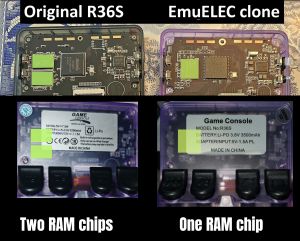 highlighted RAM chips
 -
 KMQNW000SM-B316 - Source: Reddit
 -
 CLONE WITH 2 RAM CHIPS - G80D-MB V1.0-20250609 vs standard R36S-V21 2024-12-18 mainboards
 -
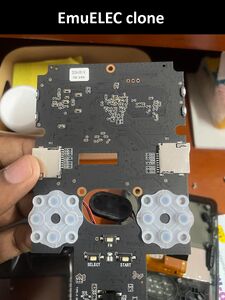 KMQNW000SM-B316 - Source: Reddit
 -
 "Sticker Clone" - KMQ7X000SA-B315 - Source: Discord
 -
 KMQ7X000SA-B315 - Source: Discord
 -
 "Sticker Clone" - KMQ72000SM-B316 - Source: Reddit
 -
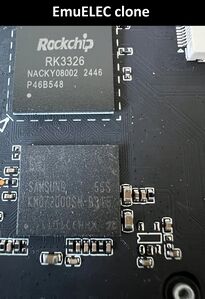 KMQ72000SM-B316 - Source: Reddit
 -
 KMQD60013M-B318 - Source: Reddit
 -
 Clone with 2 ram chips - Source: Discord - RF35XE-MB V1.1_20240508 - K36 has the internal name of "RF3500KG"
 -
 BOOT partition of one of the R36S EmuELEC clones
 -
 Image by Striike from Discord #gameconsole_r36s_etc (Retro Handhelds) - zoomed in on the crooked X button
 -
 BOOT partition of one of the R36S EmuELEC clones - Image by Send_it_96 from reddit
 -
 Looks like a normal R36S but it's a clone - Image by FiveMileDammit from reddit
 -
 Almost no options in the menu - Image by FiveMileDammit from reddit
 -
 One of the clone variants - "ArkOS 2.0 (release date)" loading message is missing during boot, God of War logo during boot sequence, EPIC-CODY is standard theme - (video at discord)
 -
 EMUELEC ES V4.7 - source
 -
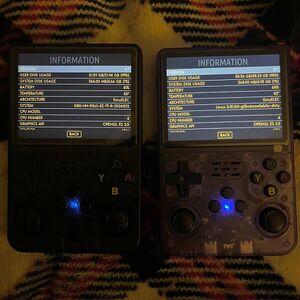
-

-
 You can see through the plastic that it has only 1 RAM chip - source
 -
 Charging animation when the device is turned off - source
 -
 slightly different bootlogo (left=real r36s - right=emuelec clone) - source
 -
 EmuELEC clone boot logo differences: Font, additional "PLEASE WAIT LOADING..." text, brownish background, slightly squeezed image
 -
 Button and dpad differences - More info at this reddit thread
 -
 R36S EmuELEC clone with RK3128 - source


.jpg)


Teardown Gallery
- Here's Teardown of one of the EmuELEC clone variants with one RAM chip (by andreyq123): https://postimg.cc/gallery/HkVBDgG
Common problems
The stock SD card is as bad as on a regular R36S and tends to corrupt very fast.
Error Message During Boot - Can't find any sytems
Solution: Install one of the available custom firmwares to a new SD card.

Stuck During Boot
Solution: Install one of the available custom firmwares to a new SD card.

Red blinking light during boot
This happens when you install the standard (or community maintained) ArkOS custom firmware on a clone.
Solution: Install/flash one of the clone specific custom firmware from below.
Custom Firmware for the EmuELEC Clone[edit]
Ultimate R36S ArkOS Fresh Install Guide (All R36S Variants)
ArkOS4clone
| arkos4clone (ArkOS for clones) | ||
|---|---|---|
 | ||
| Latest version | 
| |
| Download | ⬇️ GitHub Releases | |
| Documentation / FAQ | Github readme | |
| Info | Based on the ArkOS R3XS community maintained firmware. | |
| Officially Supported Devices |
| |
dArkOSRE
| dArkOSRE | ||
|---|---|---|
 | ||
| Latest version | 
| |
| Download | ⬇️ GitHub | |
| Documentation / FAQ | dArkOSRE Wiki & Setup Guide | |
| Hotkeys | RetroArch Hotkeys | |
| Officially Supported Devices |
| |
dArkOS
| dArkOS | ||
|---|---|---|
 | ||
| Latest version | 
| |
| Download | ⬇️ GitHub | |
| Documentation / FAQ | dArkOS Wiki & Setup Guide | |
| Hotkeys | Global & Emulator Hotkeys | |
| Officially Supported Devices |
| |
ArkOS K36
Development has been stopped for this project on August 25, 2025.
You need to change these files on your SD card's BOOT partition if you have problems after flashing custom firmware. If you have no sound, go to Ports and click on "audio fix permanent".
⬇️ Device Tree Files Repository for the K36 and similar clones
| ArkOS - K36 | ||
|---|---|---|
 | ||
| Latest version | 
| |
| Download | ⬇️ GitHub | |
| Documentation / FAQ | ArkOS Wiki & Setup Guide | |
| Hotkeys | Global & Emulator Event Keys | |
| Officially Supported Devices |
| |
ROCKNIX
Official ROCKNIX is now working on these clones. Use the "b" version from the download page.
Tool to patch the stock dtb file


UnofficialOS
| UnofficialOS | ||
|---|---|---|
 | ||
| Latest version | 
| |
| Download | ⬇️ GitHub Releases | |
| Documentation / FAQ | UnofficialOS Wiki | |
| Hotkeys | Hotkeys and Button Codes | |
| Officially Supported Devices |
| |
EmuELEC & Others
Outdated original and modified K36 EmuELEC firmware images. Also contains other firmware types. Not recommended to use. For archival purposes only.
▶ Click expand to show this section
Most of these custom firmwares run a little slower and have limited options compared to ArkOS or AmberELEC.
-

Image by Slowpokefarm - R36S EmuELEC clone running the Kinhank K36 firmware

| EmuELEC 4.8 Beta (Modified by trananhquan) | |
|---|---|
| Description | Modified EmuELEC 4.8 Beta Firmware for R36S Clone |
| Download Links | Google Drive |
| Filename / Info | EmuELEC-R36SClone.aarch64-4.8-TEST-04212024-chi.img.gz – Updated RetroArch cores, Ethernet adapter support, Portmaster working
|
| K36S Stock Firmware (Modified by AeolusUX) | |
|---|---|
| Description | Stock EmuELEC 4.7 firmware for K36S, includes unlocked EmulationStation options and working FN button |
| Download Links | Google Drive |
| Filename / Info | EmuELEC-RF3500KG.aarch64-4.7-K36.20240823143713_EXPAND_EEROMS.img.xz – Expand EEROMS partition manually
|
| K36S Unlocked Stock Firmware | |
|---|---|
| Description | K36S EmuELEC 4.7 with unlocked EmulationStation options |
| Download Links | Google Drive |
| Filename / Info | HuaKeWei_RF3500KG_K36_ZED2024050006_EE4.7_Rlease_20240823.img.gz
|
| K36 Stock Firmware | |
|---|---|
| Description | Basic stock EmuELEC image for K36 |
| Download Links | Google Drive |
| Filename / Info | K36-Stock-EmuELEC.img.xz
|
| R36S/K36 EmuELEC clone dtb files | |
|---|---|
| Description | Device Tree file for R36S-based handhelds |
| Download Link Version 1 | Google Drive – MediaFire |
| Download Link version 2 | MediaFire |
| Filename / Info | rk3326-evb-lp3-v12-linux.dtb
|
| Mount TF2 roms SD card on the EmuELEC Clone | |
|---|---|
| Description | If you have problems with getting roms to show from the 2nd SD card follow the steps in this video (thanks to dandaman73).
|
| How to mount the TF2 card properly | |
RetrOS
| RetrOS | |
|---|---|
 | |
| Latest version | 
|
| Download | ⬇️ GitHub |
| Documentation / FAQ | RetrOS @ GitHub |
| Description | Hybrid custom firmware for R36S clones. |
Other
There are also modified UnofficialOS and AmberELEC Firmware versions available that can boot up the device, but have a few issues like no sound, general unstability and are Not recommended! to use. Source: KinHank K36 discord thread
| UnofficialOS Firmware (with EmuELEC kernel) | |
|---|---|
| Description |
UnofficialOS image built on EmuELEC kernel.
Not recommended!
|
| Download Link | |
| AmberELEC Firmware (with EmuELEC kernel) | |
|---|---|
| Description |
Standard AmberELEC image using EmuELEC kernel.
Not recommended!
|
| Download Link | |
| AmberELEC Pre-Release (with EmuELEC kernel) | |
|---|---|
| Description |
Pre-release version of AmberELEC on EmuELEC kernel. Not recommended!
|
| Download Link | |
ArkOS R36MAX / R36PRO
| ArkOS R36MAX / R36PRO | |
|---|---|
| Description | ArkOS version for the R36MAX / R36PRO |
| Download Link | ⬇️ Google Drive - outdated |
| More info | S0945_RF3536K4KA_YP2024110012_R36MAX_202411131854_ArkOS.img.gz - Source - outdated
|
More info[edit]
Known Manufacturers/Distributors
Shenzhen Xumeng Technology Co., Ltd
User manual
This manual has been found on multiple temu listings. They even added "K36" to the device type info.

Link to full manual in lots of different languages: File:R36S-K36 clone user manual from temu.pdf
EmuElec “Sticker” Clone[edit]
One of the first R36S clones on the market. Known for the sticker with the board number.
EmuELEC clone with a single RAM chip (1GB) and eMMC storage. Follow this tutorial to start the firmware on the eMMC: https://www.youtube.com/watch?v=jL8PdjGYeVE
Firmware compatibility:
ArkOS K36: Works without changing dtb files.
ArkOS4clone: Select "Game Console HG36 (HG3506)" in the dtb selector tool.
Rocknix: Use this tool to generate your dtbo file using the stock dtb file DTB overlay generator for Rocknix.
Stock dtb file: https://github.com/Vi-K36/EE-Clones-DTB/tree/main/HG36%20-%20HG3506/Stock


512MB RAM Clone[edit]
Temu clones often come with internal storage and one ram chip. These devices typically have 512Mb of ram and a 512Mb swap partition on the MMC. The MMC is 4Gb in size.

G80C mainboard[edit]
G80C-MB V1.1-20250319[edit]
First spotted: 05 / 2025
EmuELEC clone without eMMC storage. Firmware compatibility:
ArkOS K36: Use Panel 8 dtb files.
dArkOSRE: dArkOSRE supporting both Panel 8 (default) and Panel 9 - See dArkOSRE Wiki for installation instructions.
ArkOS4clone: Select "R36S Clone Type 2 without amplifier" in the dtb selector tool.


G80CA-MB V1.2-20250422[edit]
First spotted: 05 / 2025
EmuELEC clone without eMMC storage. Firmware compatibility:
ArkOS K36: Use Panel 8 or Panel 9 dtb files. (alternative download link)
dArkOSRE: dArkOSRE supporting both Panel 8 (default) and Panel 9 - See dArkOSRE Wiki for installation instructions.

G80CA-MB V1.2-20250423[edit]
First spotted: 08 / 2025
Works with the ArkOS K36 and Panel 8 or Panel 9 dtb files.
ArkOS with fixed controls: ArkOS-G80CA-MB - Controller Mappings
dArkOSRE: dArkOSRE supporting both Panel 8 (default) and Panel 9 - See dArkOSRE Wiki for installation instructions.


G80CA-MB V1.3-20251212[edit]
First spotted: 01 / 2026
dArkOSRE: dArkOSRE supporting both Panel 8 (default) and Panel 9 - See dArkOSRE Wiki for installation instructions.

Clones with 2 RAM Chips[edit]
RF35XE-MB V1.1_20240508[edit]
Confirmed working with ArkOS K36 and ArkOS4clone (choose Type 3 Clone).

G80D-MB V1.0-20250609[edit]
First spotted: 07 / 2025
This is a clone with 2 RAM chips. ArkOS K36 works with the files of the Display Panel 10 version. Display Panel 5 could also work but with audio issues.
If your device works with Panel 10 files and your sleep mode is broken, try ⬇️these files. Hotkeys still don't work in N64 standalone emulators (September 5, 2025).


Known sellers:
- SUPER FUN GAME Store
- Shop1104202276 Store
Differences compared to a standard R36S
- Worse screen brightness
- Shoulder buttons are very loose (very noticable rattling while moving the device)
- Shoulder buttons are even louder than standard R36S
- L3/R3 louder than standard R36S
- Power and volume buttons are harder to press
- Smaller screw holes
- No BOOT partition (stock SD card)
- boot folder is on the EASYROMS partition (stock SD card)
- Controls in file manager are messed up. Select and start are up and down. dpad and joystick not working. (stock SD card)
- Wifi not working with dongle (stock SD card)
- No WiFi interference sound crackling (ArkOS K36)
- Up and down on the right joystick is inverted (ArkOS K36)
Boot folder content: https://discord.com/channels/741895796315914271/1344470041986596935/1400903882816622612
2 RAM Chip Clone R36S-V12[edit]
First spotted: 08 / 2025
This is another clone with 2 RAM chips.
ArkOS K36 ("ArkOS_K36_v2.0_08112025.img") with Clone Panel 8 files works. Sound works perfectly through the speaker, but audio from the 3.5 mm jack is distorted. Using USB-C headphones or a USB-C audio adapter fixes this issue (plug them in before booting to ensure the sound driver loads). The sound quality is very good, making an adapter worth buying.
It also boots with Clone Panel 5 files, but has no sound.
Users are also reporting compatibility with arkOS4clone and choosing "Type 2 wirhout amplifyer" in the dtb selector tool.
Known sellers:
- SUPER FUN GAME Store
- Microcenter
Differences compared to a standard R36S
- Some comes with a KIOXIA SD card
- No BOOT partition (stock SD card).
boot folder is on the EASYROMS partition (stock SD card).No boot folder in EASYROMS partition. Just two weird .sys configuration files. Panel 8 files working perfectly for ArkOS.- Big red omega logo in booting, plus GameBoy ASCII art when launching a game.
- Controls in file manager are messed up. Select and start are up and down. dpad and joystick not working. (stock SD card)


R36S-V20 2025-05-18[edit]
First spotted: 09 / 2025
There are two versions of this clone with different panel, battery, and button mappings within the OG Kernel 5.10 dtb files.
The OG Firmware uses a 512MB Swap partition and remaps the initially detected 750MB of Memory to 1GB using the DDR timings found in the dtb files.
                total        used        free      shared  buff/cache   available
  Mem:          975Mi       465Mi       181Mi       1.0Mi       327Mi       494Mi
  Swap:         511Mi          0B       511Mi
The DTB files for Kernel 4.4 firmwares do not include the advanced DDR timings, so the system will not be able to remap the initially detected RAM and only have 750 MB of RAM and no swap partition, providing a limited amount of resources to Emulators
                  total        used        free      shared  buff/cache   available
   Mem:           640Mi       144Mi       279Mi       7.9Mi       237Mi       496Mi
   Swap:             0B          0B          0B
The best choice for the device is the K36 Community Firmware, as the dtb files preserve advanced RAM timings, allowing the kernel to remap the RAM to 1GB.
New LPDDR3 clone — this is most likely a re-marked Nanya NT6CL256M32-H1* LPDDR3. The ridiculous part is that ArkOS only reports 719 MB.
To use this clone with arkos4clone, you'll want to use the "Clone Type 1 Without Amplifier" configuration. Other users reported success with ArkOS4Clone Panel 3.
Another possible fix to get ArkOS K36 running can be found at this reddit thread.
The R36S-V20 2025-05-18 board is also used in R36MAX consoles - source


R36S-V20 2025-09-18[edit]
First spotted: 12 / 2025
Compatible with ArkOS4Clone. RK3326, RK817, with Nanya NT6CL256T32BM-H2 LPDDR3 DRAM (896MB total).
Discussions on reddit:
- R36S-V20 2025-09-18. Can’t get ArkOS4Clone to work. Is it too early?
- Trying to identify a clone board, no matches.


R36S-V12 2023-08-18[edit]
There are multiple clone mainboards with the R36S-V12 2023-08-18 number, just like the first original R36S had.
Variant 1: Single RAM chip clone, with eMMC (KMF720012M-B214) Reddit discussion
dArkOS: dArkOSRE with verified Variant 1 dtb files - See dArkOSRE Wiki for installation instructions.

Variant 2: Single RAM chip clone (Micron D9SRZ, 1GB RAM, no eMMC). Comes preinstalled with some old version of custom ArkOS. Can be upgraded to ArkOS4Clone ver 2026-01+, which works great (select DTB as: "Type 2 Without Amplifier").
dArkOS: dArkOSRE with verified Variant 2 dtb files - See dArkOSRE Wiki for installation instructions.

Variant 3: Single RAM chip clone, with eMMC (Sk Hynix, H9TQ32A4GTMCUR-KUM 512MB RAM / 4GB eMMC NAND). Different Panel to Variant 1 and Variant 2
                total        used        free      shared  buff/cache   available
  Mem:          384Mi       111Mi       3.8Mi       3.8Mi       282Mi       272Mi
  Swap:            0B          0B          0B
dArkOS: dArkOSRE with verified Variant 3 dtb files - See dArkOSRE Wiki for installation instructions.

One of the first clones from September 2024 also had a R36S-V12 2023-08-18 marking.

R36S-Power-MB 01 - 060625[edit]
First spotted: 10 / 2025
Works with ArkOS K36 and Panel 8 files according to this reddit thread.

Fakes[edit]
Status: 🔴 Avoid
- No custom firmware support
- Weaker RK3128, Allwinner A33 or MTK6572V SoC instead of RK3326
- The OS is often on the onboard-storage (eMMC)
- Not compatible with the K36 or ArkOS for clones firmware image
- Locked down stock OS
- Some models don't have L3 and R3 buttons
RK3128 Clone[edit]
First spotted: 11 / 2024
- Rotated weaker RK3128 SoC
- RAMs on the right side
- Locked down OS


GA36 Clone[edit]
First spotted: 11 / 2025
Known differences:
- Different chip (Allwinner A33)
- Different GPU
- Runs custom build of EmuElec 4.7
- No custom firmware support as of April 2026
- Multiple mainboard versions
- Mainboard number: GA36-MB V1.0-20250730 and GA36-MB V1.1–20251025
GA36-MB V1.0-20250730: Recovery image and more info is available at this GitHub repository.
GA36-MB V1.1–20251025: EmuELEC stock card backup is available at this GitHub repository.


Gaminja Batocera Clones[edit]
First spotted: 11 / 2025
Known differences:
- White outline around the SoC and RAM section
- Different chip (Allwinner A33)
- Different GPU
- Only 512MB RAM
- Runs some kind of Batocera version
- No custom firmware support as of April 2026


PS202 MTK6572 SoC Clone[edit]
First spotted: 12 / 2025
Known differences:
- Different chip (probably MTK6572V)
- No custom firmware support as of April 2026
- Mainboard has a missing section on top
- Mainboard numbers are PS202_6GEN1_MB_V1 0 or PS202_6GEN1_MB_V11
- More info about the hardware is available at this reddit thread
Installing custom emulators and launcher:
I have seen a few posts regarding the ps202 based R36S clone with android kitkat, and no one has figured out a way to make it better however I have figured it out and would like to share with anyone who is struggling with this like I was, if you boot into the android settings via clicking the serial number several times fast, you can access developer settings, use that to enable USB debugging, then I deleted the launcher it came with as well as the basic trash emulator conglomerate that came with it. Once that was done I looked for a decent launcher to install via adb, ended up settling with an unofficial revamp of the ouya launcher for the ouya system, this gave me access to all the apps right on the home screen including settings, all I had to do from there is install my own emulators and voila I could finally add my own games, mess with emu settings and even use Bluetooth on my device. You could also install a file manager to side load apps without needing adb, but I'm fine with doing it since I have to load up my laptop either way.
More info about customizing the OS is at this reddit thread.


PS101_MB_V1.2[edit]
First spotted: 02 / 2026
Another fake without custom firmware support. Similar to the PS202 MTK6572 SoC Clone.

GB350 Clones[edit]
There is no known custom firmware for these GB350 clones as of April, 2026.
How to restore the stock OS (R36S-H.OS-V1.2): https://www.reddit.com/r/R36S/comments/1pfwwuc/how_i_changed_the_sd_card_on_a_problematic_r36s/
Experiences, setup guide and fixing things on this clone : https://www.reddit.com/r/R36S/comments/1pr60g0/r40_r36s_v26_clone_my_experience_and_guide_to/
R36S GB350/v2.6 PS1 Compatibility spreadsheet: https://www.reddit.com/r/R36S/comments/1sic6m9/r36s_gb350v26_ps1_compatibility_spreadsheet/
R36S V2.5[edit]
First spotted: 04 / 2025
It's a gb350 clone. It uses the same OS as the g350 and sf3000. So my guess is it uses the same soc as the sf3000.
https://www.reddit.com/r/R36S/comments/1kbpz9y/comment/mtqo15i/?context=3
-

Same OS as the SF3000 and GB350 - image source -

"Please Insert TF Card" message - image source


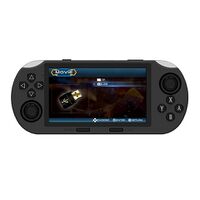
Known differences:
- No visible RAM chips
- Different SoC chip (weaker)
- NANYA NT5CB128M16HP-DI 2Gb (256MB) RAM chip
- Maybe unsoldered mini-hdmi port?
- TF2-GAME Micro SD card port exists but not working
- Runs same OS as the GB350 and SF3000
https://github.com/game-de-it/testrepo/releases/tag/SF3000_StockOS


R36S V2.6[edit]
First spotted: 07 / 2025
Another GB350 clone. Same as the R36S V2.5.

Runs the iCube/cubegm firmware. Screen resolution: 640×480. Platform backgrounds and UI assets are stored in cubegm/UI_Res.cpd (ZIP archive containing 640×480 BGRA raw images). Cover art should be 320×240 PNG.
For sync scripts, background customization, and full firmware documentation, see: R36S V2.6 Wiki & Tools
R36S-V2.6(0712)[edit]
This version has a rotated chip.
Guide with firmware to restore or use on another SD Card. https://www.reddit.com/r/R36S/comments/1ridn7u/comment/o8e5z4t/?context=1
.jpg)
R36S-V2.7(2026.01.09)[edit]
Another bad GB350 fake.
.jpg)
R36HD[edit]
First spotted: 06 / 2025
R36HD seems to be another "R36S-like" device with GB350-like hardware/software - this one has a differently shaped d-pad and HDMI output so it's more obviously different from the standard R36S


More info aboit the R36HD:
R36HD 2nd version / M18 / M37 Pro[edit]
First spotted: 06 / 2025
Sold as R36HD, M18 or M37 Pro on aliexpress. Also called R46s in some listings.
Another device with the GB350 internals according to videos and photos found on youtube and reddit.


R36SX[edit]
Some GB350 clones/fakes are labeled R36SX.
R36SX Stock OS backup (H.OS V1.2): https://www.reddit.com/r/R36S/comments/1ridn7u/virgin_stock_backup_for_r36sx_false_r36s_with/
How to setup a new SD card and add games: https://www.reddit.com/r/R36S/comments/1rmbi0t/r36sx_r%C3%A9paration_carte_de_la_carte_sd_et_ajout_de/
-

R36SX back label - image source

Standard ArkOS Compatible Clones[edit]
R36S Clone #1 (R35S+ or R36S+)[edit]
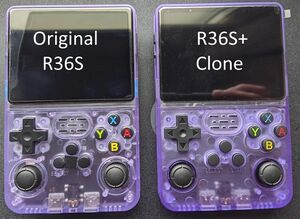
This is a "good" clone version. It can run the standard ArkOS version. Compared to the EmuELEC clone, this type is very rare.
First spotted: 06 / 2024
Update 09 / 2024: Not available anymore
Backlabel is R35S+ or R36S+
Known differences:
- The holes around the joysticks are smaller
- Labels on the buttons are thinner
- Different joysticks
- Original screen version
- The buttons feel different
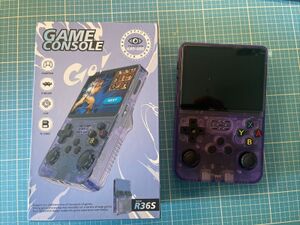
- Some have a green LED light instead of blue
Sources:
It's unclear where/how those clones are sold. If you look at "R36S" listings on aliexpress, and check the review pics, you can spot a few of these clones there. These clones are also found in the reviews from 3C MOKER Store (July 2024).
-
-

-

holes around the joysticks -

Labels on the buttons -
-

green LED


No TF2 roms card slot Clone[edit]
This is a "good" clone version. It can run the standard ArkOS version. Compared to the EmuELEC clone, this type is very rare.
First spotted: 10 / 2024
Known differences:
- no TF2 roms card slot
- no removeable battery cover
- no label on the back buttons
- color on the front buttons missing
- latest ArkOS is working fine


Round D-pad Clone[edit]
This is a "good" clone version. It can run the standard ArkOS version. Compared to the EmuELEC clone, this type is very rare.
First spotted: 12 / 2024
Known differences:
- Rounded D-pad
- New box with an Assassins Creed image
- No indentation for the letters in the face buttons
Sources:
- https://discord.com/channels/741895796315914271/1185499524257558600/1329310414827163668
- https://discord.com/channels/741895796315914271/1185499524257558600/1318782149767331840


Soy Sauce Clones[edit]
Head over to the R36S_Overview#Soy_Sauce_mainboards section for more info about these models.
Avoid buying a clone
Check the R36S Buying Guide for
- links to the cheapest listings
- trusted sellers
- general AliExpress advice/tips
- cheap accessories
- similar and better handhelds
Other Projects at the Handhelds Wiki





